
An Interim Residency Program Director (RPD) can be assigned when the permanent RPD is temporarily unavailable to manage the residency program. During the interim assignment, PharmAcademic transfers RPD responsibilities and tasks to the Interim RPD while the permanent RPD remains the RPD of record for the program and residents.
This task can be completed by the RPD or Designee.
Before You Begin
- The permanent RPD remains the official RPD of record during the interim assignment.
- Current and future RPD tasks, such as RPD cosign tasks and the ASHP Annual Report, will be reassigned to the Interim RPD. Tasks assigned to the permanent RPD in their role as a preceptor are not reassigned.
- The Interim RPD must already be added to the residency program as a preceptor or staff member.
- The Interim RPD should meet ASHP qualifications applicable to the residency program type.
- PGY1 programs: the interim RPD should be a qualified preceptor. For multi-program sites, the PGY1 interim RPD can also be a RPD for another program at the site.
- PGY2 programs: the interim RPD should be a qualified preceptor and have an active practice in the specialty area.
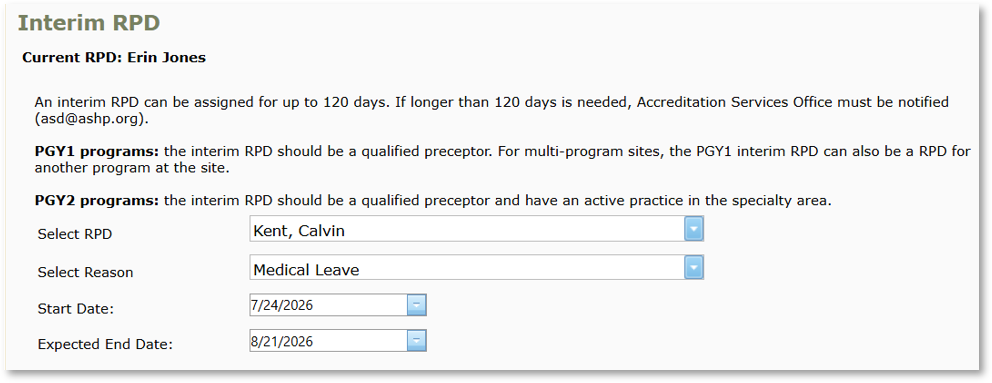
- An Interim RPD can be assigned for up to 120 days. If an assignment will exceed 120 days, please notify the ASHP Accreditation Services Division (ASD) at asd@ashp.org.
- Email notifications are sent to both the permanent and Interim RPD when the change occurs and as a warning if/when the time period approaches 120 days.
- An email notification will be sent to ASHP if a program goes beyond 120 days with an assigned interim RPD.
Important: In cases where the Interim RPD will become the Permanent RPD, you must first (1) remove the user as the Interim RPD and then follow the process to (2) reassign the program to a Permanent RPD.
If you are the Interim RPD and do not have the Designee role, please complete those two steps at the same time. If you leave the page after step 1, you will no longer have access to the page because you will not have a role that allows you to make those changes.
Instructions for Assigning an Interim RPD
- Click the Manage Program button and go to the Tools tab.
- Click Change Residency Program Director.
- Select New Interim RPD as the type of RPD change and click Next.
- Select the Interim RPD from the drop-down list. Note: If the individual is not listed, add them to the program before proceeding.
- Select a Reason for the assignment in the drop-down box.
- Enter the Start Date. Note: The start date may be today or a date in the past.
- Enter the Expected End Date. Note: PharmAcademic will alert you if the selected date exceeds 120 days. However, you can proceed with the process.
- Review the list of tasks that will be reassigned to the Interim RPD. Note: If any tasks should be completed before the reassignment, click Cancel, complete the tasks, and return to this process.
- Click Save.
Instructions for Updating an Interim RPD
- Click the Manage Program button and go to Tools > Change Residency Program Director.
- Click Edit Current Interim RPD. Click Next.
- Update the Reason and/or Expected End Date.
- Click Save.
Instructions for Removing an Interim RPD
- Click the Manage Program button and go to Tools > Change Residency Program Director.
- Click Remove Current Interim RPD. Click Next.
- Review the list of tasks that will be reassigned to the permanent RPD. Note: If any tasks should be completed before removing the Interim RPD, click Cancel, complete the tasks, and return to this process.
- Click Remove Interim RPD.