
Create custom evaluation scales to define answer choices that can be reused across multiple questions and custom evaluations. For summative evaluations, you can use the ASHP scale or create and select a custom scale; however, ASHP prefers the standard ASHP scale.
This function is available to all users who have the RPD or Designee role.
Before You Begin
Once a scale has been used in an evaluation, you can NOT edit or delete it. Create a copy of the evaluation scale and then edit it.
Instructions for Building a Custom Evaluation Scale
- Click the Manage Program button.
- Select the Tools tab.
- Click the Manage Custom Evaluation Scales link.
- Click Create New Scale.
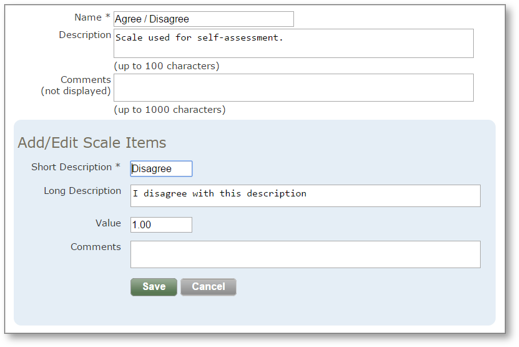
- Add the Name of the scale (required).
- Add a Description (viewable only on manage page).
- Add Comments (private).
- Click Add Item To Scale for each answer choice and complete the following fields:
- Short Description: Abbreviated answer that appears in reports
- Long Description: Full answer choice displayed in the evaluation
- Value (optional): Numeric value used for data analysis, not visible to evaluators. Note: If values should be visible to evaluators, include them in the Long Description before the text.
- Comments (optional): Internal notes not visible to evaluators
- Click the Add button.
Instructions for Editing Custom Evaluation Scales
-
Locate the scale on the Create/Edit Evaluation Scales page.
- Select the appropriate link:
-
-
Click the Edit link to modify a scale (if not yet used)
-
Click Delete to remove a scale (if not yet used)
-
Click Create Copy to duplicate a scale for editing
-
