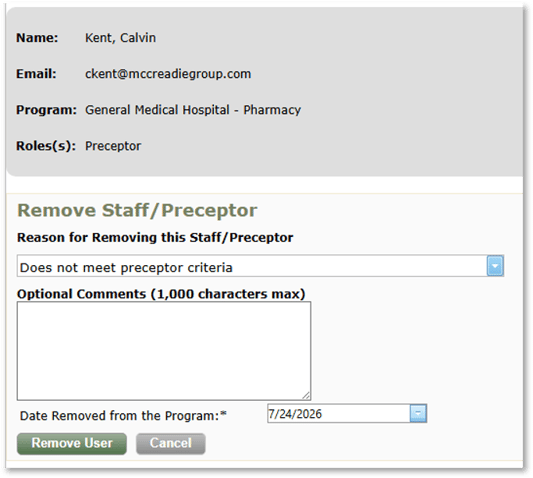
When a preceptor or staff member leaves a residency program, they should be removed from the program in PharmAcademic. Removing a preceptor will allow you to remove or reassign any outstanding tasks assigned to the preceptor.
This task can be completed by the RPD or Designee.
Before You Begin: Required Program Updates
Before removing a preceptor, make the following updates to your program for a simpler removal process:
|
Step |
Path in PharmAcademic |
|
Remove the preceptor from any current or future learning experiences on all resident schedules. Note: This will automatically reassign evaluations. |
Resident tab > select resident > Schedule tab > click the Edit link next to learning experience > uncheck the box next to the name of the preceptor. |
|
Remove the preceptor from each Learning Experience’s “Preceptor” tab. |
Learning Experience tab > View > Edit Learning Experience > Preceptor tab > Remove |
|
If the preceptor serves as a preceptor mentor, assign a new mentor. |
Manage Program > Preceptors and Staff > Edit next to the preceptor’s name |
Instructions for Removing a Preceptor
- Click the Manage Program button and go to Preceptors and Staff tab.
- Click Remove next to the preceptor’s name.
- Complete program updates: If you have not previously updated the program, you will be required to complete the following tasks before proceeding with the removal process:
- Remove Preceptor from Resident Schedule: If the preceptor is on a resident’s schedule for a current or future learning experience, you will be directed to cancel the removal process, update the schedule, and then return to this page.
- Remove Preceptor from Learning Experience: If you have not removed the preceptor from all learning experiences, you will be given the option to remove them before proceeding. Click the Remove Preceptor from Learning Experience link.
- Re-Assign Preceptor Mentor: If the preceptor is assigned as a preceptor mentor, you will be directed to cancel the removal process, re-assign the preceptor to a new mentor, and then return to this page.
- If there are any un-submitted tasks assigned to or about the preceptor, you will have the option to reassign some tasks to the RPD for completion. After reviewing the list of tasks that can and cannot be reassigned, select how you would like to resolve the outstanding tasks:
- Reassign all eligible tasks to the RPD (and remove others)
- Do not reassign eligible tasks to RPD (remove all tasks)
- Select a Reason for Removing Staff/Preceptor.
- Add Optional Comments, if needed.
- Enter the Date Removed from the Program.
- Click the Remove User button.