
Send reminder emails for overdue tasks associated with a resident. Reminders can be sent prior to closeout or at any time during the residency year. This task can be completed by the RPD or Designee.
Before You Begin
- PharmAcademic automatically sends reminder email messages. Any reminders sent using this feature are in addition to those automatic notifications.
- In this process, you may add a custom message that appears before the standard reminder text. The message will be included in the reminder email for all overdue tasks selected for that resident.
- Reminder email messages are sent approximately one hour after completing this process.
Instructions for Sending Reminders for Overdue Tasks
- Click the Manage Program button.
- Go to the Tools tab.
- Click “Send Reminders for OverdueTasks Related to a Resident.”
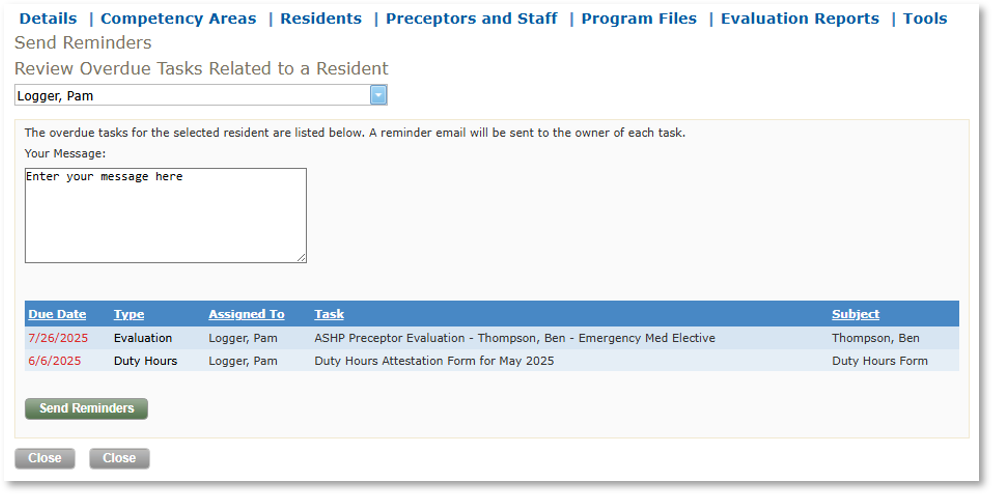
- Select the resident from the drop-down list. A list of overdue tasks associated with the resident will be listed. The reminder emails will be sent to everyone in the “Assigned To” column for all listed tasks.
- Enter a message in the Your Message field (optional). This will be prepended to the original text and included in the email sent for all the listed tasks.
- Click the Send Reminders button.
Related Articles
Receiving and Reviewing Email Notifications