
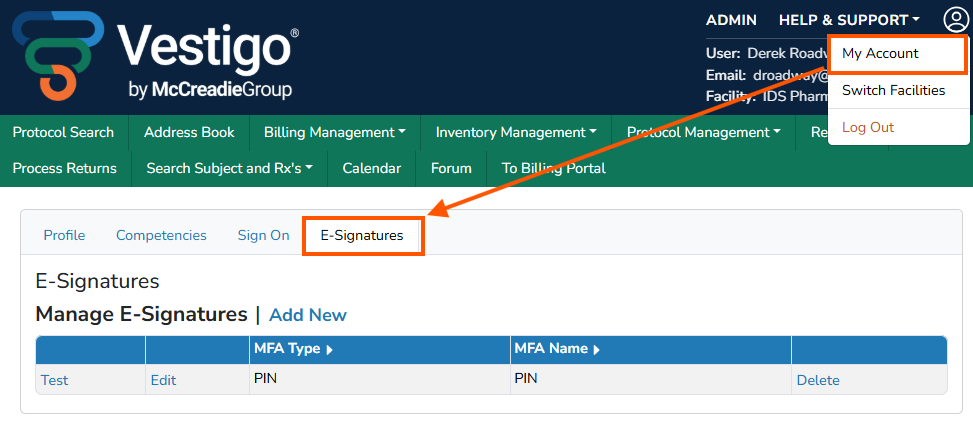
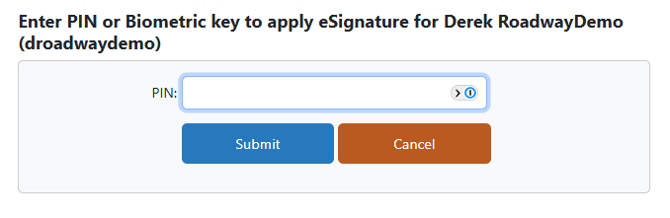
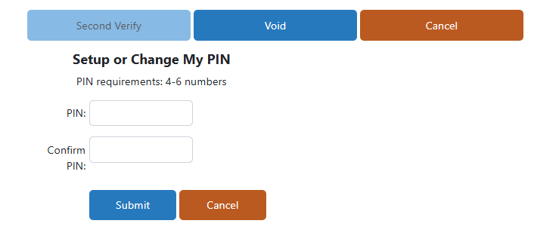
When e-signatures are required, users will be prompted to set up a PIN under My Account or during the transaction process and the e-signature will be visible in the audit trail. If a user who has verification permissions does not have a pin established when they go to verify a prescription, they will be asked to establish one at the time of verification.
Contact Vestigo Support for additional MFA options such as biometric fingerprint scanning.
Adding an E-Signature
Adding an E-Signature does not impact historical data where the verifier did not have a E-Signature and E-Signature was not utilized.
- Hover your mouse over Main
- Click on My Account
- Click on the E-Signatures tab
- Click Add New
If you do not see Add New, you already have a pin established and your site is not setup for additional authentication.
- Ensure E-Signature Type is set to PIN
- Enter a 4-6 numeric digit pin that you will remember
- Enter the same pin in the Confirm Pin section
- Click Submit
Modifying an E-Signature
Modifying an E-Signature will not update historical data where the E-Signature was used.
- Hover your mouse over Main
- Click on My Account
- Click on the E-Signatures tab
- Click Edit
- Enter a 4-6 numeric digit pin that you will remember
- Enter the same pin in the Confirm Pin section
- Click Submit
Testing an E-Signature
- Hover your mouse over Main
- Click on My Account
- Click on the E-Signatures tab
- Click Test
- Enter your pin that was previously established
- Click Submit
If it is correct, users will receive a "E-Signature Applied" validator.
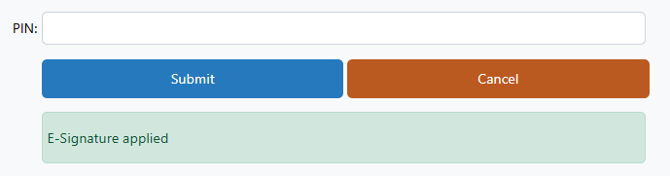
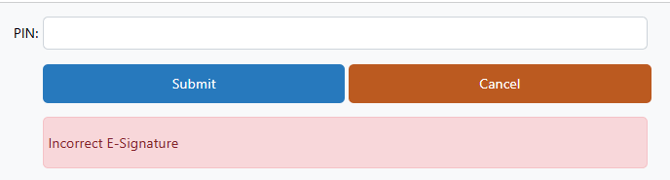
If it is incorrect, users will receive an "Incorrect E-Signature" validator.
Deleting an E-Signature
Deleting an E-Signature will not update historical data where the E-Signature was used.
- Hover your mouse over Main
- Click on My Account
- Click on the E-Signatures tab
- Click Add New
- Ensure E-Signature Type is set to PIN
- Enter a 4-6 numeric digit pin that you will remember
- Enter the same pin in the Confirm Pin section
- Click Submit