
When a Vestigo user modifies a contact's profile, it records the user, the date and time, and what they modified. This provides better compliance with 21 CFR Part 11 and also maintaining a record that can be reviewed internally.
Permissions Needed
AdminMain – Access the application administrative menu
Accessing the Patient Audit Log Viewer
- Hover your mouse over Main at the top right of the screen and click on Application Administration
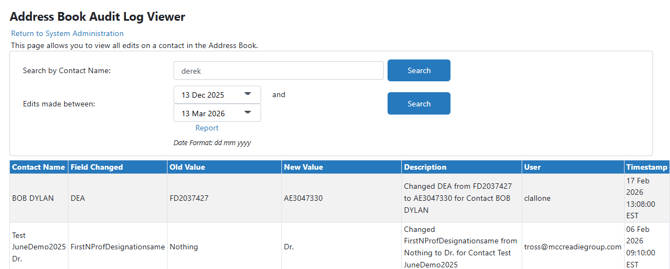
- Click on Address Book Audit Log Viewer under Audit Log Viewers
- You can search one of two ways
- By the searching by contact name
- Enter the contact name
- Click Search
- By applying Date filters
- Adjust the date filters as needed
- Click Search
- Optionally, you click the Report link to download a PDF of the displayed information
