
Vestigo address book houses all persons to be listed as contacts on protocols as well as those who will be granted a user account to access Vestigo.
Users can enter contact specific and prescribing information such as DEA, NCI, CTEP and NPI Identifiers and Expiration Date, and Department or Service. This information will enable users to establish contacts on the protocol. Identifiers, designations, and expiration dates for identifiers will allow users to track and update prescribing information, as needed.
Warning - External Monitors should not be added to the Address Book but rather through the monitor pathway.
Required Permissions
ContactsSearch - Search for contacts
ContactAddEdit - Add/Edit a contact. ContactsSearch is required to look up a contact
Additional permissions may be required to create Contact Roles or Edit Protocol Contacts
Contents
Contacts
Any person to be added to any study as a contact, whether or not they are also a user, must be added to the address book. Once a contact record is created, they can be added to protocols with contact roles or they can be assigned a Vestigo Account.
Any changes to a contact’s address book entry can be reviewed in the “View Audit Trail” link.
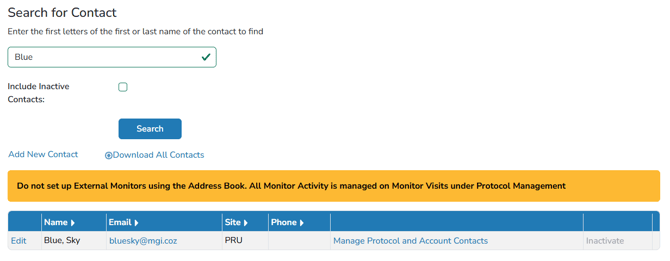
To search for a contact, users will want to use either the first or last name only.
Note - Sites cannot delete any contacts from the Address Books as contacts may be needed for the integrity of historical transactions. However, they can be inactivated if they are no longer associated with an active protocol.
Once contacts are added to protocols and the protocol remains active, the users can click on Manage Protocol and Account Contacts to see all the protocols that contact has been added to. 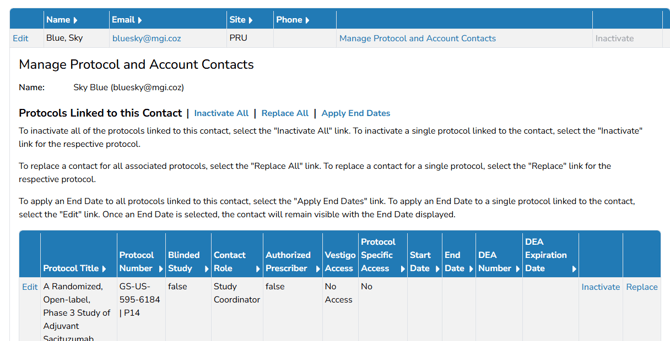
Optionally, Vestigo allows users to download all contacts from the Address Book with the Download All Contacts link on the main page of the Address Book.
Monitors
External monitors/CRA’s should NOT be added to the Address Book. Instead, monitors are added to the Protocol Management – Monitor Visits pathway; this pathway creates the monitor account in a central database which allows any Vestigo site to select that monitor account.
Internal Auditors from your organization should be entered in the Vestigo Address Book and associated with their appropriate protocol. If you try to add an internal contact to your address book but cannot because they are a monitor, please contact support@mccreadiegroup.com. We can determine if we can inactivate the monitor account.
Fields on the Contact Record
When a user creates a contact record, the only fields required are email, first name, and last name. However, Vestigo allows sites to add additional information to be added to the contact record and certain fields can change how Vestigo functions with that record.
In this section, we will cover all the fields available on a contact record.
* denotes a required field for each contact.
| Field | Definition or Where/How Used |
| Email * | The email associated to the contact. This must be a unique value and duplicate emails cannot be entered. |
| Prefix | If added, the prefix may appear in reports, labels, or DARFs. |
| First Name * | The first name of the contact. Will appear on reports, labels, or DARFs. |
| Middle Name | If added, the middle name or initial may appear in reports, labels, or DARFs. |
| Last Name * | The last name of the contact. Will appear on reports, labels, or DARFs. |
| Suffix | If added, the prefix may appear in reports, labels, or DARFs. |
| Professional Designation | If added, the prefix may appear in reports, labels, or DARFs. |
| Site | This is a drop down menu that will auto populate address information if the site has been |
| Site Name/Address Information | Users can optionally add site information about where the contact record is located. This information can be manually entered, or you can use the Site drop-down to populate this information. Information entered here will only appear on an Address Book Report |
| Phone Number/Alt. Phone/Fax/Pager | Users can optionally add phone information for the contact. This information can be manually entered, or you can use the Site drop-down to populate this information. Information entered here will only appear on an Address Book Report |
| DEA Number | This is an optional field for provider DEA numbers. If the site is contracted for an EHR interface, the DEA number is used to match providers from EHR messages to contact records. If there is a match during the dispense, users will not be required to choose a provider during dispensation. |
| NCI Investigator Number | If added, the NCI number may appear on reports or DARFs if the contact is the primary investigator or the protocol is receiving inventory by ordering investigator. Also drives filters when adding contacts in bulk to protocols |
| NCI Expiration Date | If the expiration date is known, this can be added here and will flag during dispensing that the provider's NCI number is expired. This is not a hard stop during dispensing. |
| ACTG Investigator Number | If added, the ACTG number may appear on reports or ACTG DARFs if the contact is the primary investigator or the protocol is receiving inventory by ordering investigator. |
| NPI Number | If added, the NPI may appear in protocol reports. |
| NCPDP/NABP Provider ID | If added, the NPI may appear in protocol reports. |
| Department | Optional field but can be added to certain contacts. Adding a department allows Vestigo site users to add contacts in bulk by filtering down to Department. Can be used in conjunction with Service. |
| Service | Optional field but can be added to certain contacts. Adding a service allows Vestigo site users to add contacts in bulk by filtering down to Service. Can be used in conjunction with Department. |
| Badge Scan | Optional field but can be added to certain contacts. If the site is contracted for Chain of Custody and the contact record has a number added here that matches a barcode scan when recording a Chain of Custody step, it will match it to the user |