
Client information and settings affect the entire site and are accessible to users with appropriate roles and permissions. Facility settings can be edited by users with specific roles in that facility.
This section of Vestigo can be accessed by going to Application Administration > Edit Client and Facility Settings.
Permissions Needed
AdminMain – Access the application administrative menu
EditClientandFacilitySettings - Along with AppAdmin, this permission should enable/disable the "Edit Client and Facility Settings" page
Client Information
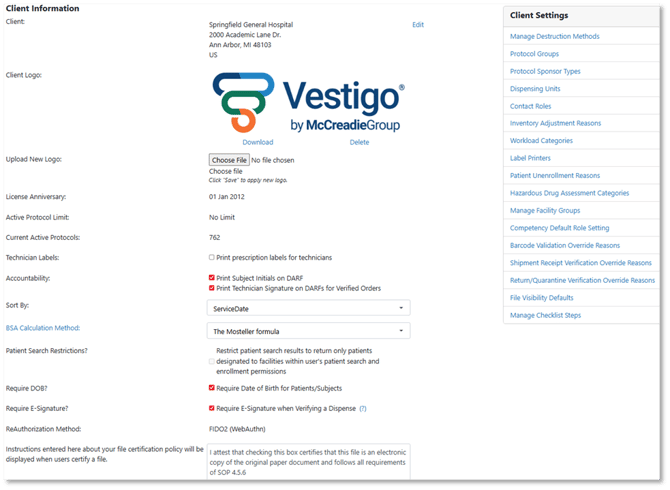
This section displays the client's name and address, the Vestigo License Anniversary date, and the Active Contract and Current Protocol Count.
If you need to edit client site information, you can do so here by clicking the Edit. Some sites choose to pull the Client information to their labels, and this can be modified here. If the name needs to modified, users will need to contact Vestigo Support with a justification on why the Client Name should be modified. This is different from individual facility information.
Client Logos appear on various reports throughout out Vestigo, but an example would be the Protocol Budget Report. If your site has a logo, you can add a logo by clicking the Choose File button, navigating to the picture, then clicking Save. By default, site's do not come with a logo.
Sort By
This determines whether the DARF sorts by Service Date (default) or the TimeStamp. Sorting by Service Date allows you to control placement of items on the DARF by the editable date of service. Recording Time Stamps cannot be edited and the DARFs will sort by the timestamp of the record.
BSA Calculation Method
This dropdown allows a client to select which BSA calculator they wish to use for their implementation. Please note that this setting applies to the entire client system and changes in the calculation method do not update historical BSA values calculated under a different method.