
Use these reports to review protocol activity, dispensing history, participant and visit details, authorized prescribers, send outs, chain of custody documentation, protocol contacts, access codes, and checklist completion in one place.
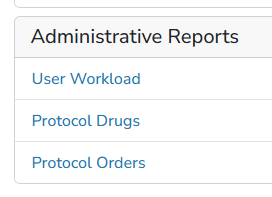
| Report | Description | File Format |
| Protocol Orders Report | The Protocol Orders report is designed to display most information related to the protocol order builds. This report will pull in all active orders across all active protocols |
Spreadsheet |
|
|
||
| Protocol Drugs Report | The Protocol Drugs report is designed to display most information related to the drug build. This report will pull in all active drugs across all active protocols. | Spreadsheet |

|
||

User Workload Report
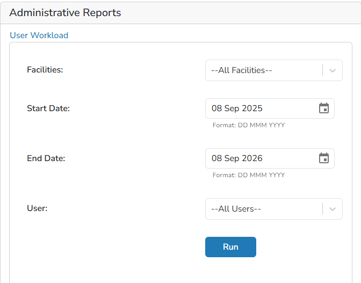
The User Workload report shows counts of major activities within Vestigo in a given time period. This report uses the following filters: User(s), Facility(s), Start and End dates.
The user Workload report is designed as a tally system and values are displayed for activity that has occurred. For example, the number of dispenses at a particular facility or the number of times a new protocol was added. If no activity had occurred for that time period no row or value will display.
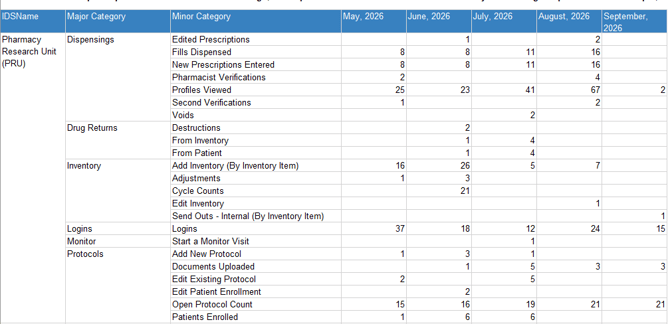
This report should not replace a Workload Effort in minutes, but can be substituted in if workload has not been established at the site.
Since this report is a tally style report, certain categories can be inflated if the site performs repeat actions like Edited Prescriptions.
User Workload Report Definitions
|
Major Category |
Minor Category |
Definition |
|
Billing |
Ad Hoc |
Number of ad hoc charges entered |
|
Charges Edited |
Number of charges were edited |
|
|
Dispensings |
Edited Prescriptions |
Number of Rx’s Edited |
|
Fills Dispensed |
Number of Dispenses (new Rxs and Refills) |
|
|
New Prescriptions Entered |
Number of new Rx’s entered |
|
|
Patient SendOut |
Number of participant send outs completed |
|
|
Pharmacist Verifications |
Number of Rx’s Verified by RPh |
|
|
Profiles Viewed |
Number of participant profiles viewed |
|
|
Second Verifications |
Numbers of Rx’s 2nd Verified by RPh |
|
|
Voids |
Number of Rx’s Voided |
|
|
Drug Returns |
Destructions |
Number of Destructions documented |
|
From Inventory |
Number of Drug Returns from inventory |
|
|
From Patient |
Number of Drug Returns from Rx’s |
|
|
Returned to Sponsor |
Number of Returns to sponsor documented |
|
|
Inventory |
Add Inventory |
Number of inventories receive transactions completed 1 receive of 10 items = 1 transaction |
|
Adjustments |
Number of inventory adjustment transactions completed 1 adjust of 10 items = 1 transaction |
|
|
Cycle Counts |
Number of Cycle Counts completed |
|
|
Edit Inventory |
Number of Inventory Transaction edits |
|
|
Immediate Transfer |
Number of immediate transfers completed |
|
|
Send Outs - External |
Number of External Send Out transactions |
|
|
Send Outs - Internal |
Number of Internal Send Out transactions |
|
|
Logins |
Logins |
Number of successful logins |
|
Monitor |
End a Monitor Visit |
Number of monitor visits closed |
|
Schedule Add/Edit Monitor Visit |
Number of monitor visits edited or added |
|
|
Start a Monitor Visit |
Number of monitor visits started |
|
Protocols |
Add New Protocol |
Number of new protocols created |
|
Close Existing Protocol |
Number of protocols closed through close out pathway |
|
|
Documents Uploaded |
Number of documents uploaded |
|
|
Edit Existing Protocol |
Number of protocols edited |
|
|
Edit Patient Enrollment |
Number of participant enrollments edited (inactivate/change arms) |
|
|
Open Protocol Count at Beginning of Month |
Number of open protocols at beginning of month |
|
|
Patients Enrolled |
Number of participants enrolled. Count includes: - A new participant, never enrolled into Vestigo is enrolled into Vestigo and a study - A participant already enrolled into a study, is then enrolled into another study - A participant enrollment is edited to change the enrollment from one arm to another. When participant enrollment is triggered in any of those options, it’s against the facility where the user is logged in, not necessarily the facility on the study. |