
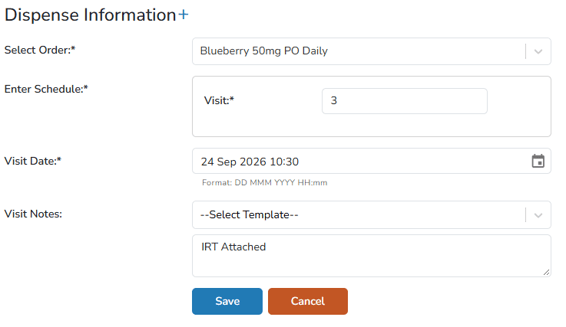
Users can schedule patient visits on the participant’s profile screen. The scheduled visit includes the Order Description, Visit Date, and Time. Notes can also be entered manually or by using site-built templates. Once the visits are scheduled, they will appear in the Patients visits tab, as well as on the calendar associated with the facility where the user was logged in when entering the visit
-
Navigate to the Protocol
-
Click on the Patients/Subjects Tab
-
Locate the participant and click on the MRN
-
Click on Schedule a Patient Visit
-
If the participant is actively enrolled in multiple protocols, click Select the correct Protocol
-
Select the Order from the drop down menu
-
If the order requires Schedule Information, enter the requested information
-
Enter the Visit Date
-
(Optional) Enter any Visit Notes, or use the drop down menu to select a pre built template
-
Click Save
After saving, the user is navigated to the Patient Visits tab for this Participant. If there are any documents to attach to the visit like IRT information, click on Manage Files to upload that information.