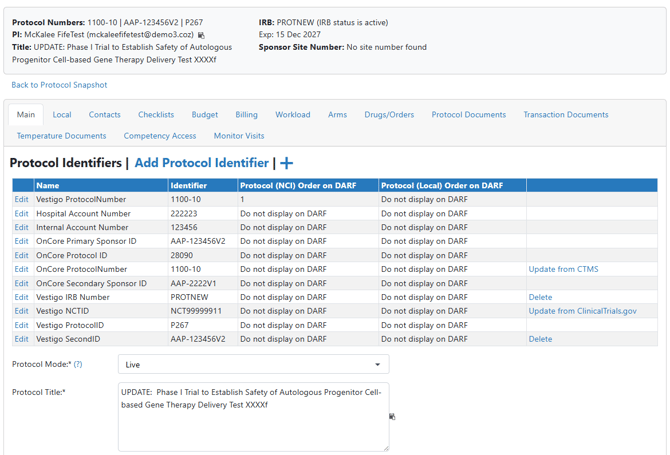
Site users with appropriate permissions can create new protocols based off information from a connected Clinical Trial Management System (CTMS) interface such as OnCore, Velos, or Clinical Conductor. Vestigo will automatically populate all the fields from the CTMS to expedite protocol building.
This requires your site is contracted for a CTMS interface. If you are not contracted for a CTMS interface at your site, please contact your Customer Success Manager for more information.
Required Permissions
ProtocolCreate - Allows the creation or copying of a new protocol. Users must have this permission in the facility they want to add the protocol to.
- On the Vestigo home screen, click on Add New.
- n the Alternate ID field, enter the exact Protocol Number for the unique protocol in your CTMS. This can commonly be referred to as the OnCore Protocol Number or Velos Protocol Number.
The protocol number must be an exact match to locate the protocol in the CTMS. If you are not getting any matches, check you are using the right number or if there are any spaces that were inadvertently copied.
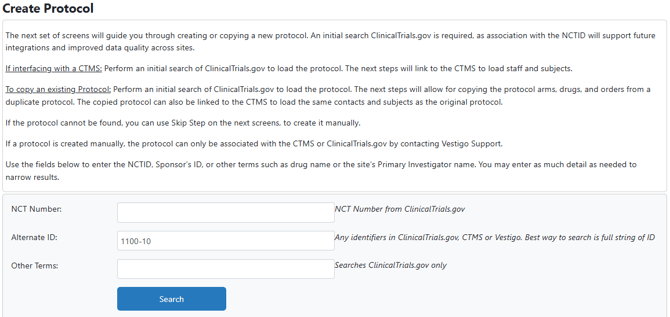
- Click the blue Search button
- The first screen with show results from ClinicalTrials.gov. You will want to click on the yellow Skip Step button.
- The second search screen will search your CTMS for a match. If there is no match, please verify you are using the correct number from your CTMS.
If there is a match, click on the blue Select link.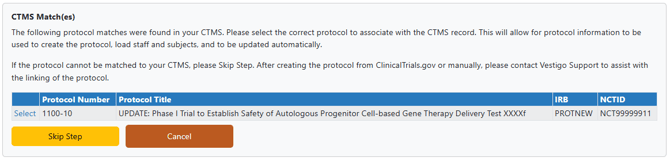
- The next screen will now ask you what Facility you would like this protocol to be in. You can select the appropriate facility from the drop down menu and click Next.
- Additionally, you can also add the Sponsor Site Number if you know it. This can always be added at a later date.
- If there are no possible duplicates in your Vestigo instance, Vestigo will automatically pull all the latest information from CTMS to build your protocol and you can skip to step 8.
If there are possible duplicates, the last screen will display all possible duplicates based off your search criteria. You may need to review the existing protocols to determine if a new one is needed or not.
If a new protocol is needed and you want to build it from your CTMS, click on the yellow Ignore Warning and Save New Protocol.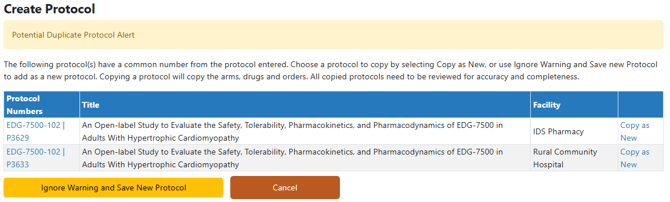
- Once the information is pulled, it will bring you to Edit Protocol of the newly created protocol.