
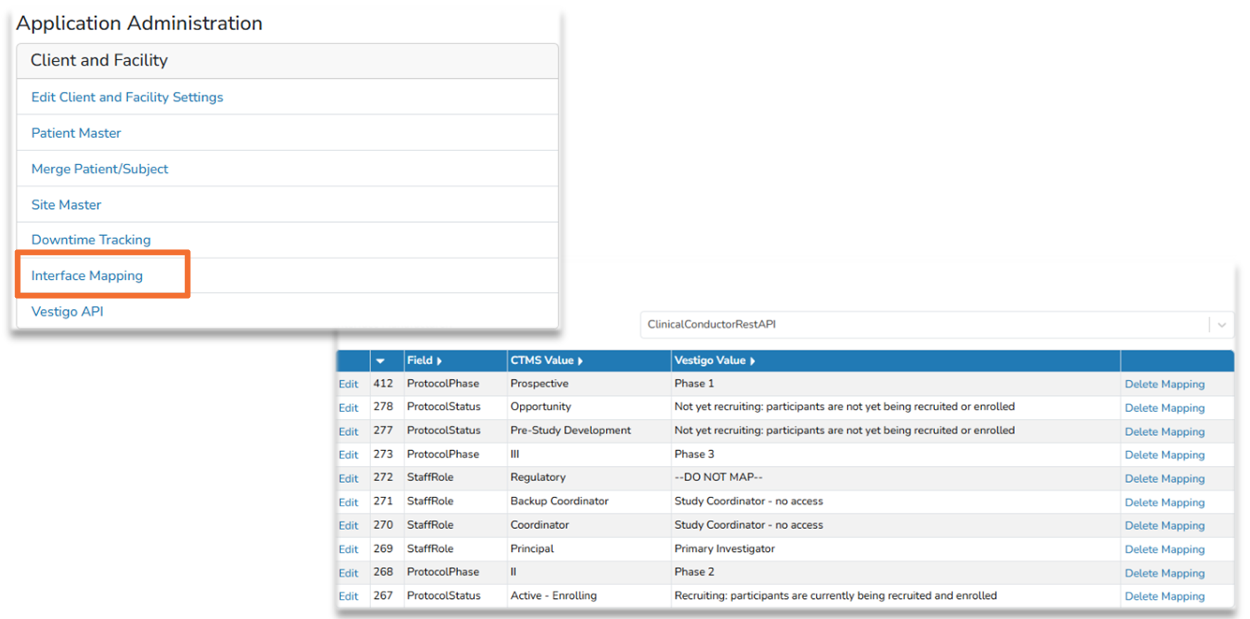
During implementation of the interface, we establish mappings for certain CTMS values and how they should map in Vestigo. Those fields include Protocol Phases, Staff Roles, and Protocol Statuses.
The images below are examples for updating the Interface Mapping Table. Each client will have their own interface mapping table.
Required Permissions
AdminMain - Access the application administrative menu
InterfaceMapping - Ability to manage CTMS interface mapping
Adding a Mapping
After implementation, any time an unknown value for a specific field is encountered from the CTMS, it will be placed in the “Interface Mapping” table. The user with appropriate permissions can then go into the “Interface Mapping” found under Application Administration and define the value. The next transaction that crosses the interface with this value will populate as designated.
- Navigate to Application Administration
- Click on Interface Mapping
- Locate the new CTMS value and click on Edit. This is generally a CTMS value that has no Vestigo Value
- Select the appropriate Vestigo Value from the drop down menu
- Click Update
If the CTMS value that you are looking for does not exist, please contact support.
Modifying an Existing Mapping
As sites and roles evolve, it may be necessary to modify how the interface is mapped. Modifying existing mappings can help correct this, but it is important to understand the effects of that. If the site changes a Study Coordinator role mapping is updated from one Vestigo Value to another Vestigo Value, it will inactivate the previous protocol contacts where the mapping matched and add a new protocol contact with the new role
- Navigate to Application Administration
- Click on Interface Mapping
- Locate the CTMS value and click on Edit.
- Select the appropriate Vestigo Value from the drop down menu
- Click Update
Deleting an Existing Mapping
Deleting an existing mapping will remove the current mapped CTMS value, but it will reappear on the next interface update as a "new" value that needs mapping.
- Navigate to Application Administration
- Click on Interface Mapping
- Locate the new CTMS value and click on Delete Mapping