Vestigo allows users to record Cycle Counts of on hand inventory. When a cycle count is record, it creates a line item on the DARF and is visible on DARFs and various reports throughout Vestigo.
There are three ways to record Cycle Counts: the global navigation menu, at the protocol, or in the facility alerts.
Notes - Cycle counts cannot occur on inventory that has not been received (documenting zero on hand when you have not received inventory yet). Cycle Counts cannot occur on inventory that is in quarantine or returns.
Required Permissions
CycleCount - Ability to record cycle counts of inventory.
CycleCountAlerts - Ability to view and resolve cycle count alerts under the Inventory Alert
Contents
- The Cycle Count Screen
- Accessing the Cycle Count Screens
- Recording a Cycle Count
- Addressing Cycle Count Discrepancies
The Cycle Count Screen
The cycle count screen may look slightly different depending on how you accessed the cycle count, but the overall functionality is the same. The screen will show all on hand inventory on the screen.
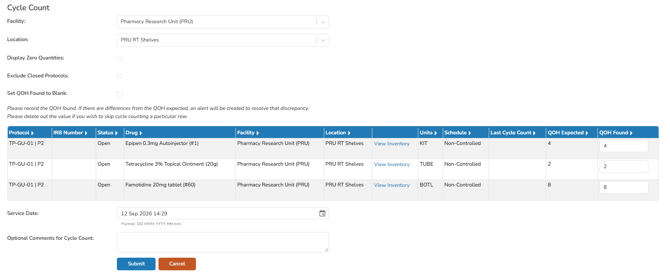
Users can optionally use some flags to modify how the displayed grid works.
-
If the Display Zero Quantities is selected, all inventory will be displayed in any location it has been received into and is currently zero. This will allow users to record cycle counts in locations that don't currently have inventory, but has in the passed.
- Exclude Closed Protocols will remove all on hand inventory from closed protocols from the grid. In previous versions of Vestigo, users were able to close protocols while inventory was still on hand. This is no longer possible and is only visible at the Global Cycle Count level.
- Set QOH Found to Blank allows users to set the last column to blank. This will force the user to enter a value in the last column prior to recording.
Tip - If the QOH Found is blank during cycle count recording, the line item will be skipped.
The cycle count screen shows a general QOH for the inventory in that location. Users can optionally click the View Inventory link to see detailed information about the inventory on hand for that location.

The Service Date will default to the current date and time but can be adjusted if needed.
The last section allows users to optionally add comments to the cycle count. The comment entered will appear on the DARF and various reports throughout Vestigo.
Accessing the Cycle Count Screens
- Global Cycle Counts - The global cycle count function can be accessed through the global navigation menu under Inventory Management > Cycle Count.
- Protocol Cycle Counts - The protocol level cycle count function can be accessed through Protocol Snapshot > Inventory Tab > Cycle Count this Protocol.
-
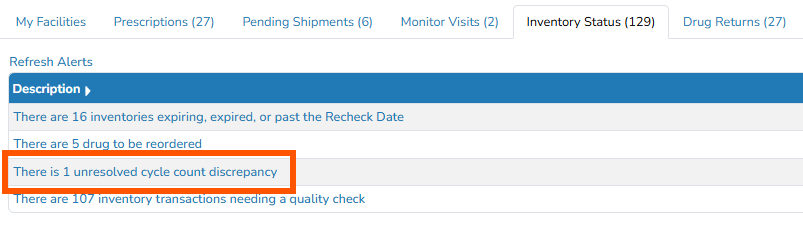
Facility Alert Cycle Counts - The Cycle Count alert will show all inventory that requires a cycle count performed at time intervals.
Note - The requirement must be setup on the drug build and the alert must be enabled in Application Administration.
Recording a Cycle Count
- Access one of the cycle count screens listed above
- Select a Location
- Optionally adjust any flags as needed
- Ensure the values in the QOH Found section are accurate
- (Optional) Adjust the Service Date
- (Optional) Enter comments for the cycle count
Warning - If recording a global level cycle count, ensure the information entered into comments are not protocol specific. Once saved, you cannot modify the comments.
- Click the blue Submit button
Cycle Count Discrepancies
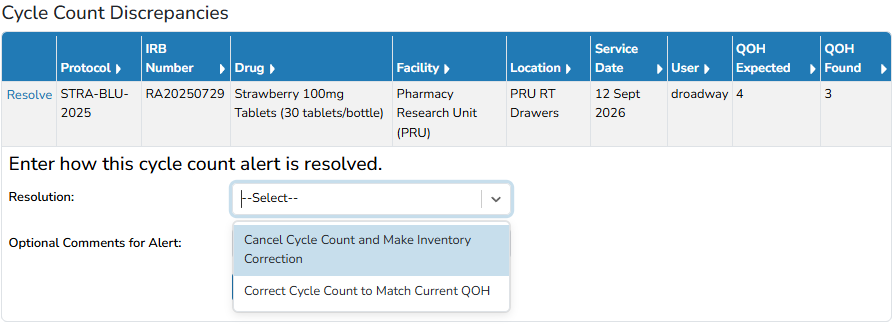
If the quantity found does not match the quantity on hand in Vestigo, an alert will be created. Cycle count discrepancies aren't fully saved cycle counts, yet.

When a discrepancy is created, user interaction is required to resolve. When resolving the cycle count discrepancy alerts, users can either indicate that the quantity on hand matched the cycle count or cancel the cycle count record and do an inventory adjustment, if needed.