
If the shipment has not been fully completed yet, users can delete the shipment from the Receive Inventory screen.
Once the shipment is marked as complete, users are unable to delete the shipment and remove the inventory. You will need to adjust the inventory down and re-receive the inventory if that is appropriate.
For adjusting down, we recommend using the Data Entry Correction reason and be descriptive as possible. When re-receiving, we also recommend including an accountability comment about the re-receive.
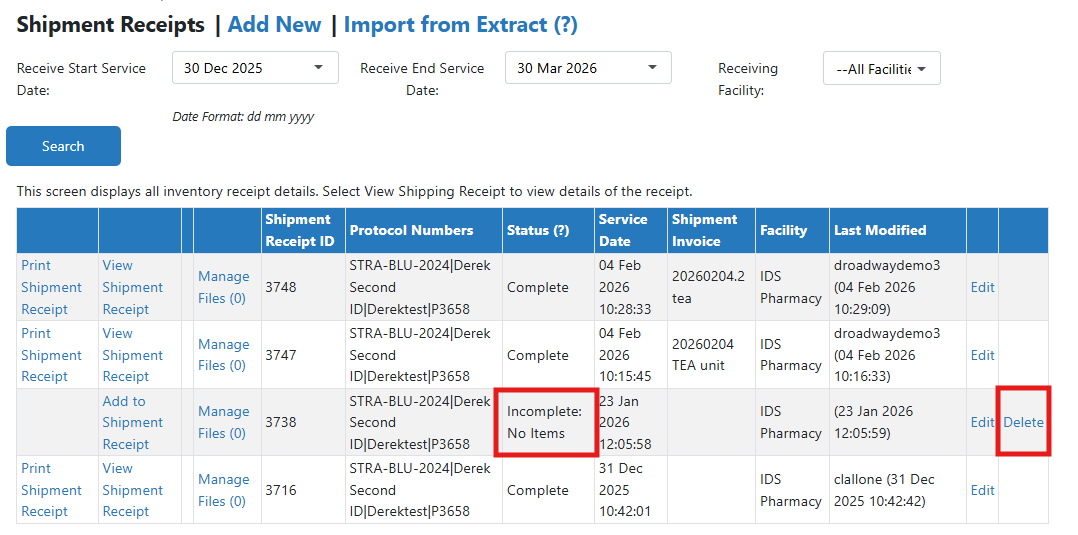
Deleting an Incomplete Shipment
Deleting an incomplete shipment is permanent and cannot be reversed.
- Navigate to the protocol
- Click on the Inventory Tab
- Click on Receive Inventory
- Click on the Delete link in the last column
- Click OK to confirm the receipt deletion