Shipment receipts is one of the core functions of Vestigo and the only way to add inventory to protocols. It also allows users to edit those receipts with limitations.
Once a shipment receipt is marked as completed, users no long have the option to add, edit, or delete inventory from the receipt. Users can only modify the high level details such as Service Date or Invoice Number.
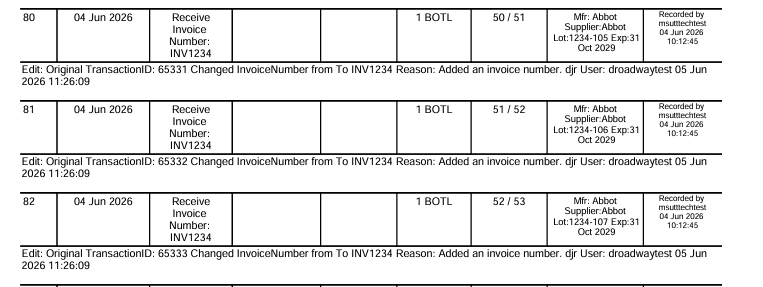
Editing a shipment receipt will create an edit against the shipment receipt and be visible on the DARF and protocol audit trail.
- Navigate to the protocol
- Users may have to complete any competencies that are associated with the protocol.
- Click on the Inventory Tab
- Click on Receive Inventory
- Locate the receipt and click Edit on the right
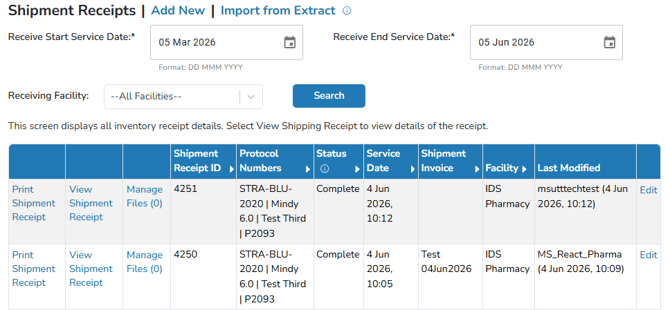
- A menu will open under the shipment that will display all the available fields that you can edit.
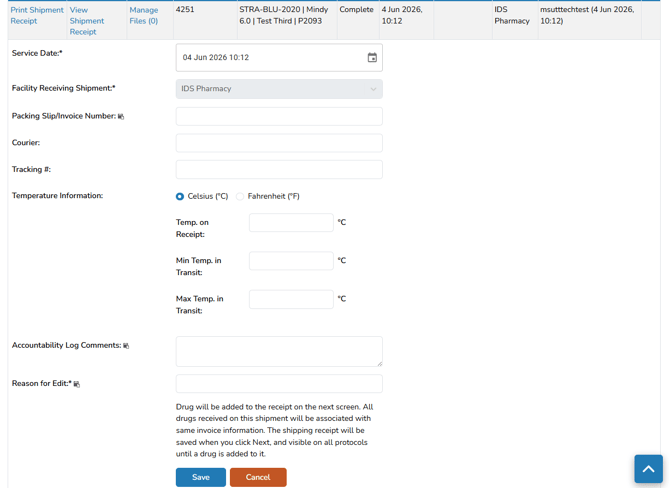
- Service Date - The service date can be adjusted to a different date and time. This impacts where the inventory will show as received on the DARF, and also Shipping Receipt reports.
- Packing Slip/Invoice Number - This is the invoice number that is available on shipping information. This number may not always be available and is not required.
- Courier - The courier that the shipment was delivered by.
- Tracking # - The tracking number for the courier.
- Temperature Information - Temperature information relating to the shipment. This information does not appear on the DARF, but in various Shipping Receipt reports
- Accountability Log Comments - Comments that are visible on the DARF and other reports. This section can be used to highlight an issue or special circumstance with the shipment, but is not required.
- Users are not able to update the facility receiving the shipment.
- For any edit to a shipping receipt, a Reason for Edit is required by the user. This will appear on all inventory receives associated with this shipment. We recommend being as descriptive as possible in the reason.
- Click the blue Save button
Once the edit is saved, it will be visible on the transaction and the DARF. If the inventory is itemized, it will be visible multiple times for each item received on that shipment receipt.