
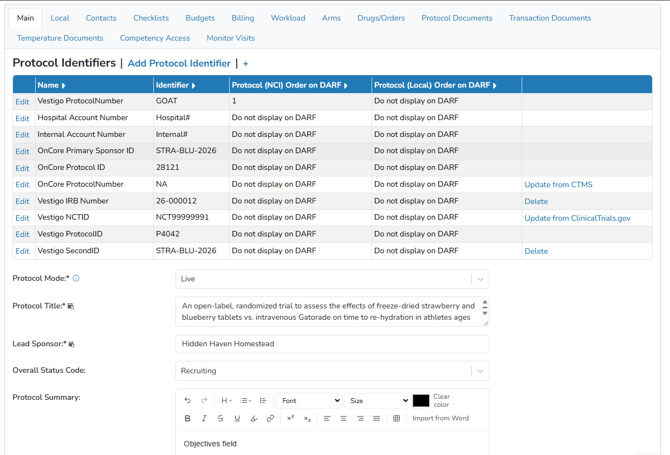
If the protocol is added through ClinicalTrials.gov using the NCT number, these fields will be automatically populated from ClinicalTrials.gov but can be modified if needed. When complete with this screen, click the Save and Next button.
If the protocol is added manually, these fields can be added as appropriate.
Protocol number, second and third ID can be any identifiers depending how the site decides to number protocols. They can be edited at any time, however, be sure not to use any protocol numbers currently in use on another protocol.
Fields marked with an asterisk are required; clipboard icons mark fields shown on the Drug Accountability Record (DARF). The Protocol Identifier Grid, found on the Protocol Snapshot page, displays protocol identifiers from sources like ClinicalTrials.gov, local site numbers, and other systems. If a protocol has an NCT ID#, additional IDs from ClinicalTrials.gov will be shown in the grid. Not all identifiers can be edited, depending on their source.
Required Permissions
ProtocolManagement – Allows a user to have the “Edit Protocol” option and access to the Main tab
ProtocolSnapshot – Ability to view the Summary page of a Protocol (Protocol Snapshot)
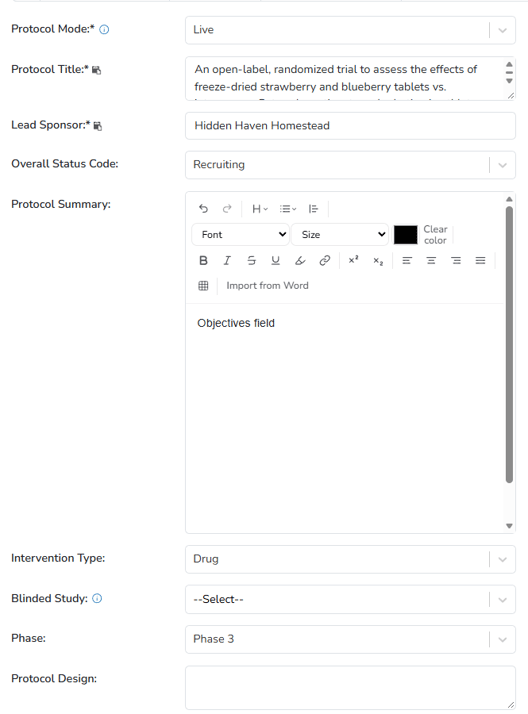
Protocol Mode
A Build protocol lets users create budgets, checklists, manage contacts, and view reports. Arms can be built in Live mode and switched to Build mode, but the Arms tab is hidden in Build mode. Build protocols do not count toward license limits. Once a protocol adds a Drug Build, it cannot revert to Build mode.
A Live protocol has all tabs complete and is ready for inventory management, enrollment, and dispensing. Live protocols count toward license limits.
Protocol Title
The title of the protocol. If importing a trial from ClinicalTrials.gov, the official title will import, but can me modified.
Tip - If your site utilizes a CTMS and the protocol is linked to a CTMS, this field is controlled by the CTMS. Any changes made will be temporary.
Lead Sponsor
The lead sponsor for the protocol.
Tip - If your site utilizes a CTMS and the protocol is linked to a CTMS, this field is controlled by the CTMS. Any changes made will be temporary.
Overall Status Codes
The protocol status code controls if dispenses or participant enrollments can happen on the protocol.
Tip - If your site utilizes a CTMS and the protocol is linked to a CTMS, this field is controlled by the CTMS. Any changes made will be temporary.
|
Not yet recruiting |
The study has not started recruiting participants. This status prevents participant enrollment. |
|
Recruiting |
The study is currently recruiting participants. |
|
Enrolling by invitation |
The study is selecting its participants from a population, or group of people, decided on by the researchers in advance. These studies are not open to everyone who meets the eligibility criteria but only to people in that particular population, who are specifically invited to participate. |
|
Active, not recruiting |
The study is ongoing, and participants are receiving an intervention or being examined, but potential participants are not currently being recruited or enrolled. |
|
Suspended |
The study has stopped early but may start again. |
|
Terminated |
The study has stopped early and will not start again. Participants are no longer being examined or treated. |
|
Completed |
The study has ended normally, and participants are no longer being examined or treated (that is, the last participant's last visit has occurred). |
|
Withdrawn |
The study stopped early, before enrolling its first participant. |
|
Unknown |
A study on ClinicalTrials.gov whose last known status was recruiting; not yet recruiting; or active, not recruiting but that has passed its completion date, and the status has not been last verified within the past 2 years. |
Protocol Summary
A summary of the protocol. When building the protocol from ClinicalTrials.gov, the information in this field will cross over only once. After the initial information load, sites can use this field how they want.
Intervention Type
What is being studied; in the IDS, it is typically a Drug.
Blinded Study
The Blinded Study field is an optional field that displays in the Protocol Header and intended for reporting and alerting the user of the protocol blinding status. There is currently no functionality associated with this designation, other than the protocol header will display “This is a blinded study and pharmacy is unblinded”.
Phase
The phase of the protocol.
Tip - If your site utilizes a CTMS and the protocol is linked to a CTMS, this field is controlled by the CTMS. Any changes made will be temporary.
Protocol Design
A description of the design of the protocol. When building the protocol from ClinicalTrials.gov, the information in this field will cross over only once. After the initial information load, sites can use this field how they want.