
Sites can choose at the facility level to set a default quantity of labels that print during each transaction. These numbers can be overridden by the user during each transaction.
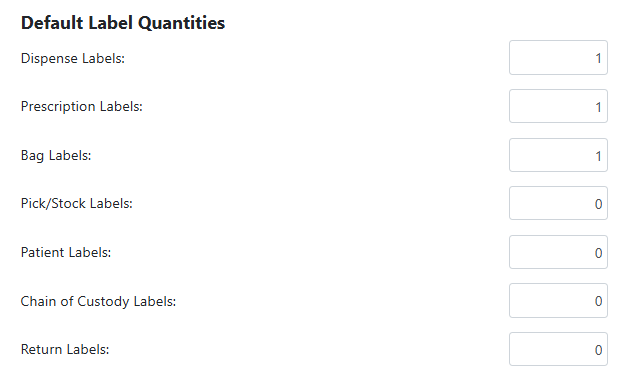
Dispense/Prescription/Bag Labels - These labels print at time of dispense entry or verification. When they print is impacted by the site setting of Print prescription labels for technicians in client settings.
Pick/Stock Labels - These labels print during any inventory receives or adjusts. If the inventory is itemized, one label will print for each item.
Patient Labels - These labels print when you enroll a subject in a protocol.
Chain of Custody Labels - These labels print if your site is contracted for CoC and print during dispensation.
Returns Labels - These labels print when your site processes either a subject return, or inventory quarantine.
Permissions Needed
AdminMain – Access the application administrative menu
EditClientandFacilitySettings - Along with AppAdmin, this permission should enable/disable the "Edit Client and Facility Settings" page
FacilityEdit - Along with AppAdmin and EditClientandFacilitySettings access, this permission should enable/disable to view/edit facilities located under "Edit Client and Facility Settings" page
Users must have a role that has the FacilityEdit permission in the facility to make any modifications.
Modifying Label Quantities Defaults
Adjusting the default quantities are at the facility level and do not impact other facilities.
- Navigate to Application Administration
- Click on Edit and Client Facility Settings
- Click on View/Edit on the appropriate facility
- Adjust the quantity on the label type(s) as needed
- Click Save