
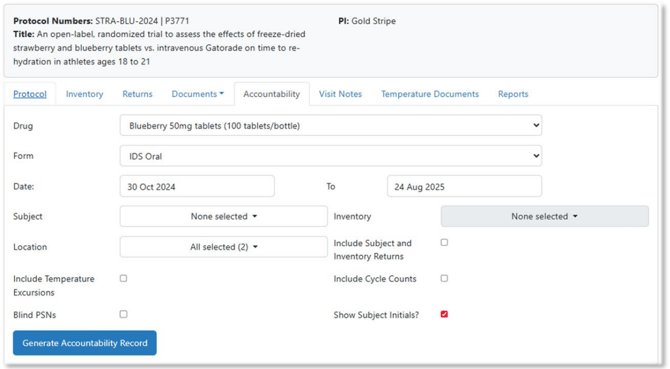
Vestigo electronically manages inventory and automatically creates drug accountability records. Protocol Drug Accountability Record Forms (DARF) can be generated on demand with several different layouts. Although the IDS pharmacy can preselect a layout, Protocol Specific Users can change it as needed.
The chosen format determines which if other fields are filterable or displayed, but using filters is optional for generating any DARF.
Tip - We recommend using the default DARF form that the IDS suggests as the default. If one is not selected, the recommended forms are NCI or IDS.
The client site can pre-select some filters including blinding PSNs and to include cycle counts and temperature excursions. Some considerations regarding DARF generation:
- When No Subject is selected in the Subject dropdown, it will download the DARF with all subjects. This is the overall accountability log.
- Blinding the PSNs on the DARF does NOT fully blind a monitor; they can still potentially see PSN on another screen or report.
- Depending on other settings established by the site, pre-selecting or checking to include temperature excursions and cycle count may or may not display these transactions. If these do not show, please note, this is not an error but determined by these other settings.
- If selections, such as Blind PSN or Show Subject Initials, are pre-set by the site, the protocol specific user cannot uncheck certain boxes.
If the Protocol Specific User has questions or requests, they should be contact the site IDS pharmacy directly.