
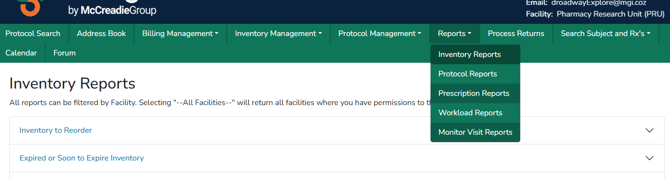
This article provides an overview of Vestigo’s inventory and operational reports, with each report designed to support accountability, audit-ready documentation, and real-time visibility across clinical trial pharmacy workflows. From reorder and expiration tracking to cycle counts, temperature excursions, destruction records, shipment receipts, and transaction history, these spreadsheet-based reports help teams monitor inventory status, maintain accurate and uniform data, and make informed decisions more efficiently.
Required Permissions
InventoryReportsAccess - Ability to run Inventory Reports at the global level.
Note - Users will need a role with the report permission per facility they should have access to in order to generate reports for that facility. If a user has a role with these permissions in less than all facilities at that client site, when they select “All Facilities”, the report will only include data for those facilities they have access to, not all facilities actually available within the client site.
| Report | Description | File Format |
| Inventory to Reorder | Lists the drugs where the quantity on hand is less than the reorder point. You are able to select which facility to generate this report against. | Spreadsheet |
| Expired or Soon to Expire Inventory | Lists the inventories that are expired or going to expire for the days specified | Spreadsheet |
| Inventory with Unknown Expiration Dates | Lists the inventory records that have an expiration date of Unknown. Able to run by facility. | Spreadsheet |
| Inventory Transaction by Date | Ability to view all inventory transactions for a given date range and facility. There are three formats available: Summary, Detailed, Flat Detailed | Spreadsheet |
| Inventory by Location (Cycle Count) | Lists the inventories by location and formatted for recording cycle counts. You can specify the location and whether you want a summary report (inventories are grouped by drug and location) or a detailed report which lists each inventory item separately. | Spreadsheet |
| Completed Cycle Counts | An Excel spreadsheet containing information on cycle counts by protocol or all protocols by drug, location, and schedule. | Spreadsheet |
| Returns Remaining by Facility | Lists all returns that have not been designated as destroyed or returned to sponsor. | Spreadsheet |
| Inventory ReOrder by Location | Lists the drugs where the quantity on hand is less than the reorder point and a location. | Spreadsheet |
| Quality Check Status Report Destruction Report | Returns an Excel spreadsheet of protocol transactions with confirmed or rejected status with username of user that reported status. See additional information on next page | Spreadsheet |
| Destruction Report | Report of all items destroyed, and the details entered for the destruction. | Spreadsheet |
| Temperature Excursions | Lists all temperature excursions for a protocol and/or inventory location within a date range. | Spreadsheet |
| Inventory on Hand with Patient Count and Dispense Quantity | Returns a list of all drugs on studies with the current QOH, active patient count, and dispensed quantity. | Spreadsheet |
| Protocol Drug Status Report | A detailed report with dates of last activities; useful for NIH/NCI Reporting. | Spreadsheet |
| Shipment Receipts Report | A summary and detailed version report of shipment receipts. | Spreadsheet |
| Send Outs Report | Lists all the send outs done for a given date range and facility. | Spreadsheet |
Tip - Files that can be downloaded as a spreadsheet allow the user to apply site filters or sorting.