
As the protocol treatment ends, participants can be removed from the study to help maintain an list of active participants that are getting treatment. Managing participants in a protocol is done on the Patients/Subjects tab of the Protocol Snapshot. On this tab, you will see a list of participants currently enrolled in the protocol and links to modify certain parts of the participant’s enrollment.
Required Permissions
ViewPatientSubjects - View patient/subjects in a protocol. Protocol Snapshot permissions are required
EnrollPatients - Ability to enroll patients into a protocol
EditPatientEnrollment - Allows the user to edit the patient study number and the date of enrollment for a given patient/subject enrolled in a protocol
-
Navigate to the Protocol
-
Click on the Patient/Subjects Tab
-
Click on the Edit Enrollment link for the appropriate participant
-
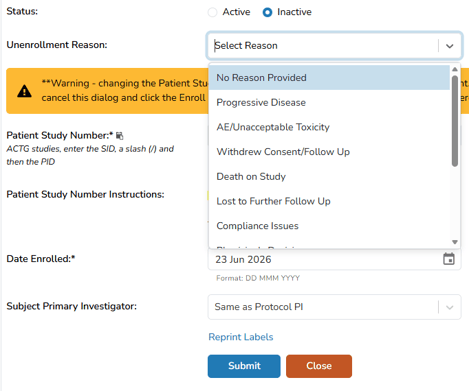
Change the status radio button from Active to Inactive
-
(Optional) Select a Unenrollment Reason for this participant
-
Click the blue Submit button
If a reason was selected in step 5, the reason will show on the Patient Enrollment History for this Protocol report at the bottom of the Patients/Subjects Tab