
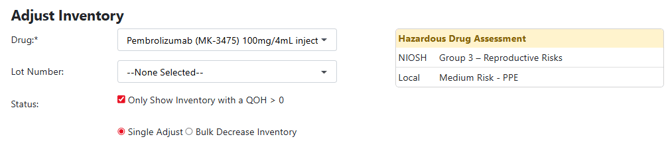
Vestigo allows sites to add local assessment categories to drug builds. These categories appear in various screen throughout the protocol if you are interacting with a drug that has a local assessment category. The categories are also visible on various reports at the global and protocol level.
Sites are responsible for determining what their local categories should be. Once the categories have been established, users can start applying them to drug builds.
- Add a Local Assessment Category
- Modify a Local Assessment Category
- Inactivate a Local Assessment Category
- Reactivating a Local Assessment Category
- Deleting a Local Assessment Category
Permissions Needed
AdminMain – Access the application administrative menu
EditClientandFacilitySettings - Along with App Admin, this permission should enable/disable the "Edit Client and Facility Settings" page
ManageLocalAssessmentCategories - Application Administration > Edit Client and Facility Settings > Hazardous Drug Assessment Categories. Ability to create, edit, and delete Local drug hazardous assessment categories.
Adding a Local Assessment Category
- Navigate to Application Administration
- Click on Edit and Client Facility Settings
- Click on Hazardous Drug Assessment Categories under Client Settings on the right side
- Click on Add New
- Enter the description of the new Assessment Name
- Set the Sort order or leave as 1
The Sort Order determines the order in which the categories display to the user
- Leave the Is Active flag checked
- Click Save
Editing a Local Assessment Category
Site users can edit a local assessment category that has never been used yet or has been removed from all drug builds. While a category is applied to a drug build, users can only modify the sort order of a category.
- Navigate to Application Administration
- Click on Edit and Client Facility Settings
- Click on Hazardous Drug Assessment Categories under Client Settings on the right side
- Click on Edit for the category you wish to edit
- Make the appropriate modifications to the role as needed
- Click Save
Inactivating a Local Assessment Category
Inactivating a local assessment category does not impact historical information but will prevent users from being able to use the reason on future unenrollment's.
- Navigate to Application Administration
- Click on Edit and Client Facility Settings
- Click on Hazardous Drug Assessment Categories under Client Settings on the right side
- Click on the Active link for the category you wish to inactivate
Reactivating a Local Assessment Category
- Navigate to Application Administration
- Click on Edit and Client Facility Settings
- Click on Hazardous Drug Assessment Categories under Client Settings on the right side
- Click on the Inactive link for the category you wish to reactivate
Deleting a Local Assessment Category
Site users can delete a category if the category is not applied to a drug build. If the category is currently in use, you can only inactivate the category.
Deleting a local assessment category is permanent and cannot be undone by the site.
- Navigate to Application Administration
- Click on Edit and Client Facility Settings
- Click on Hazardous Drug Assessment Categories under Client Settings on the right side
- Click on Delete for the reason you wish to delete
- Click Ok to confirm the modification