
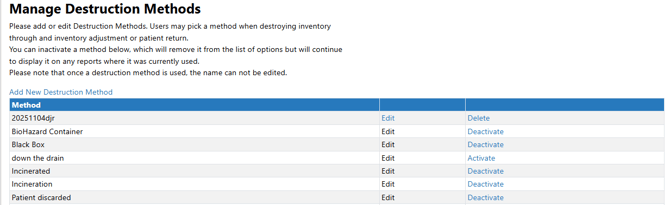
Users with appropriate permissions are able to add or modify existing Destruction Methods.
Permissions Needed
AdminMain – Access the application administrative menu
EditClientandFacilitySettings - Along with AppAdmin, this permission should enable/disable the "Edit Client and Facility Settings" page
DestructionMethods - Application Administration > Edit Client and Facility Settings > Manage Destruction Methods. Ability to manage Destruction Methods
Destruction Methods are visible on various reports throughout Vestigo, including the DARF.
Adding a Destruction Method
- Navigate to Application Administration
- Click on Edit and Client Facility Settings
- Click on Manage Destruction Methods under Client Settings on the right side
- Click on Add New Destruction Method
- Enter the description of the new Destruction Method
- Leave the Active status check marked
- Click Save
Editing a Destruction Method
Sites can only edit a destruction method if the method has never been used. If the method has been used, users will only be able deactivate the method.
- Navigate to Application Administration
- Click on Edit and Client Facility Settings
- Click on Manage Destruction Methods under Client Settings on the right side
- Click on Edit for the Destruction Method that needs to be modified
- Update the name as needed
- Click Save
Deleting a Destruction Method
Sites can only delete a destruction method if the method has never been used. If the method has been used, users will only be able deactivate the method.
There is no confirm screen for deleting a destruction method and cannot be reversed by site or support.
- Navigate to Application Administration
- Click on Edit and Client Facility Settings
- Click on Manage Destruction Methods under Client Settings on the right side
- Click on Delete for the Destruction Method that needs to be deleted
Deactivating a Destruction Method
Deactivating a destruction method prevents it from future use. Destructions that already used this method will continue to reflect the used destruction method.
- Navigate to Application Administration
- Click on Edit and Client Facility Settings
- Click on Manage Destruction Methods under Client Settings on the right side
- Click on Deactivate for the Destruction Method that needs to be inactivated from future use
Reactivating a Destruction Method
- Navigate to Application Administration
- Click on Edit and Client Facility Settings
- Click on Manage Destruction Methods under Client Settings on the right side
- Click on Activate for the Destruction Method that needs to be reactivated