
Drug returns is a special virtual inventory location built within each protocol that is used to store and manage drug return data. There are two sources of returns:
- Returns from dispenses tracked by the pharmacy
- Inventory adjustments for managing expired or unused drugs in returns
The features described in all Drug Return KBs are available for use with either source of return; however, certain functions may vary depending on the selected source.
There are also three different dispositions:
- In Returns - Items that were adjusted out of inventory or returned from a prescription. Items with this disposition are likely to still be available for review at the site.
- Destroyed - A final disposition. Meant for inventory that has been physically destroyed at the site following local policies
- Returned to Sponsor - A final disposition. This is used when inventory has been returned to the sponsor.
Required Permissions
ReturnHistory - Return History in a protocol under Inventory>Manage Drug Returns
DrugReturns - Ability to view and process the drug returns in a protocol
VerifyPatientReturns - Ability to Verify Patient Returns
OverridePatientReturnVerification - Ability to Override Required Patient Return Verifications
PatientReturns - Ability to view/add patient drug return.
InventoryReturns - Ability to view and return inventory under Drug Returns queue in the Returns alerts
Contents
Facility Alerts
From the facility alerts, users can click on Drug Returns tab and then can click on any of the options below to access a grid style of returns
-
There are X inventories in quarantine - This will display all inventory that has been quarantined that does not yet have a final disposition.
-
There are X active protocols with items in returns - This will display all prescription returns that do not yet have a final disposition.
- There are X Items in Quarantine needing verification - If your site uses Quarantine Verification, this alert will show any inventory that hasn't been verified by another user yet.
- There are X Patient Drug Returns needing verification - If your site uses Participant Return Verification, this alert will show any inventory that hasn't been verified by another user yet.
- There are X inventories requiring a Witness of Destruction - If any drug builds are set to require a Witness of Destruction, this will show all inventory that has been destroyed, but not witnessed by another user.
- There are X inventories requiring a Witness for Return to Sponsor - If any drug builds are set to require a Witness of Return to Sponsor, this will show all inventory that has been returned to sponsor, but not witnessed by another user.
Tip - If you open any of the verification or witness alerts and nothing displays, that means you were the user who did the initial action. You cannot be your own verification or witness to the action. If sites allow it, you can override the verifications, but witnessing cannot be overriden.
Protocol Level Drug Returns
Each protocol will have its own designated module to help users manage drug returns. Users will need to navigate to the protocol > click on the inventory tab > then click on Manage Drug Returns
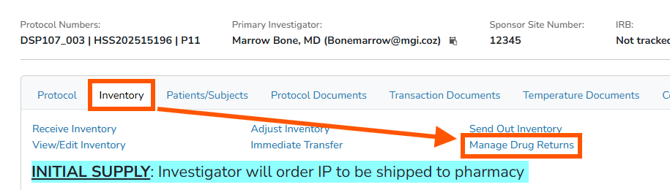
Manage Drugs Screen
The Manage Drug Returns screen is broken down into 4 different tabs:
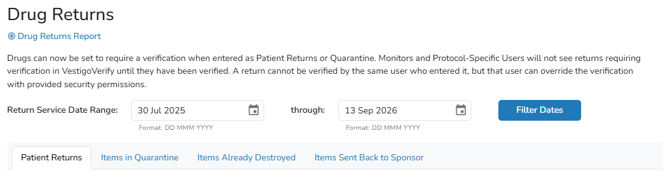
- Patient Returns - any recorded participant returns that do not have a final disposition.
- Items in Quarantine - any inventory adjustment that does not have a final disposition.
- Items Already Destroyed - Inventory that has already been destroyed. This can include inventory adjustments or participant returns.
- Items Sent Back to Sponsor - Inventory that has already been returned to the sponsor. This can include inventory adjustments or participant returns.
Users can select one of the tabs to change the information displayed on the screen. The date filter should automatically populate to the first day inventory was received on the protocol, but can be adjusted if needed.
Return Verifications
This section will be visible on both Patient Returns and the Items in Quarantine tabs regardless of if the site is using any sort of return verification settings. Users can verify or override any return verification from this screen.

Patient Returns and Items in Quarantine Tabs
These two tabs will display all information pertaining to any recorded returns. Further details regarding the return are accessible by selecting the service date. This is also the method used to update information associated with a return. While the service date may be adjusted for participant returns if necessary, it is not editable for items that are in quarantine.
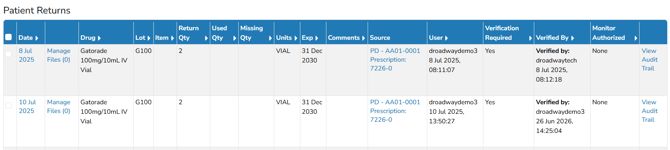
If a monitor has authorized an item in one of these tabs for a final disposition, the Monitor Authorized column may show Destruction or Return to Sponsor.
Tip - Authorizations are not required to record a final disposition for items in returns, but it is recommended to receive approval from all parties prior to recording the final disposition.
To support comprehensive prescription return reconciliation, Vestigo provides the option to record both Used and Missing Quantities on participant returns. While these fields are not mandatory for processing a return, unlike the required Return Quantity, they can offer additional insights. Monitors are able to view any data entered in these fields within the same dispositions on the Vestigo Verify platform.
The Source column will display either as a link to a prescription if it is a participant return, or it will display as Inventory Adjusted with the reason used during adjustment.
If any edits were made to the return record or actions, a View Audit Trail link will appear.
Items Already Destroyed or Sent Back to Sponsor Tabs
These two tabs will display all information pertaining to any returns that have a final disposition. Further details regarding the return are accessible by selecting the service date. This is also the method used to update information associated with a return.

The Source column will display either as a link to a prescription if it is a participant return, or it will display as Inventory Adjusted with the reason used during adjustment.
The column next to source will display as Destruction Authorization Number or Return Shipment Number, depending on the tab you are in.
If any edits were made to the return record or actions, a View Audit Trail link will appear.
On either of these pages, users will have the option to Record a Witness, and on the destruction tab, the user will be able to generate a Certificate of Destruction.
Documents on Returns
Vestigo enables organizations to achieve their desired level of paperless operations. By allowing users to add files to returns—whether inventory or prescription—Vestigo supports the creation of comprehensive digital records. This document management system offers straightforward navigation and efficient organization capabilities.
In Manage Drug Returns, users can add files to any disposition by clicking Manage Files and using drag-and-drop to upload documents or images. Selecting Visible to Protocol makes the document appear on the Transaction Documents tab, while choosing Visible to Monitor also allows monitors to view it.
If any return is edited or a return action is processed in any disposition, the associated document(s) will move accordingly. However, if a return is deleted by selecting the "Delete this Return" option, this will result in the removal of the document as well.