
Vestigo includes a set of predefined roles that can be assigned to contacts at the protocol level. Examples are authorized prescriber and primary investigator. Clients have the option to add more roles as required, but users cannot modify the default set of roles
Permissions Needed
AdminMain – Access the application administrative menu
EditClientandFacilitySettings - Along with App Admin, this permission should enable/disable the "Edit Client and Facility Settings" page
ContactRoles - Application Administration > Edit Client and Facility Settings > ContactRoles. Ability to add and edit contact roles
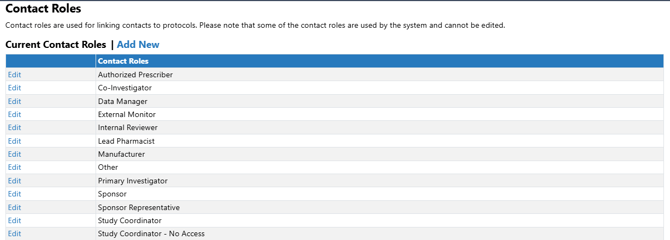
Standard Vestigo Contact Roles
Vestigo provides these contact roles for every client, and the names cannot be modified by site users.
Authorized Prescriber
Co-Investigator
Data Manager
External Monitor
Internal Reviewer
Lead Pharmacist
Manufacturer
Other
Primary Investigator
Sponsor
Sponsor Representative
Study Coordinator
Study Coordinator - No Access
Study Coordinator – Returns
Study Nurse
Sub-Investigator (FDA)
Adding a Contact Role
- Navigate to Application Administration
- Click on Edit and Client Facility Settings
- Click on Contact Roles under Client Settings on the right side
- Click on Add New
- Enter the description of the new Contact Role
- Choose whether the contact role should default as a Authorized Prescriber on a protocol
This can be overridden at the protocol level when adding a contact with this role.
- Click Save
Editing a Contact Role
Site users have limited modification ability on system generated roles and are limited to checking the Default Authorized Prescriber on those roles. Names cannot be edited.
- Navigate to Application Administration
- Click on Edit and Client Facility Settings
- Click on Contact Roles under Client Settings on the right side
- Click on Edit for the contact role you wish to edit
- Make the appropriate modifications to the role as needed
- Click Save
Inactivating a Contact Role
If sites are wanting to inactivate an existing site created role, please contact Vestigo Support with the request and justification. Inactivating Contact Roles does not impact historical information but will prevent users from being able to use the contact role on future protocols.