
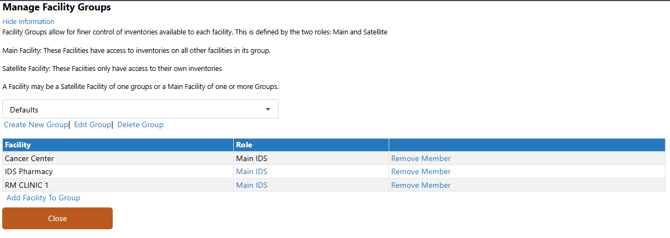
When a site has multiple facilities and wants to lock down visibility of inventory to specific facilities, Facility Groups can be used. Facility groups are defined by the two roles: Main and Satellite.
By default, there is one facility group with all facilities listed as Main at each site. This can be modified, but can cause issues regarding site inventory visibility.
Prior to making any changes to facility groups, it is recommended to contact Vestigo Support for further guidance.
Required Permissions
AdminMain - Access the application administrative menu
EditClientandFacilitySettings - Along with AppAdmin and EditClientandFacilitySettings access, this permission should enable/disable Ability to edit client information under "Edit Client and Facility Settings" page.
ManageFacilityGroups - Application Administration > Edit Client and Facility Settings > Manage Facility Groups. Ability to create and manage Facility Groups. AdminMain access is required.
Accessing Facility Group Management
- Navigate to Application Administration
- Click on Edit and Client Facility Settings
- Click on Manage Facility Groups on the right side under Client Settings
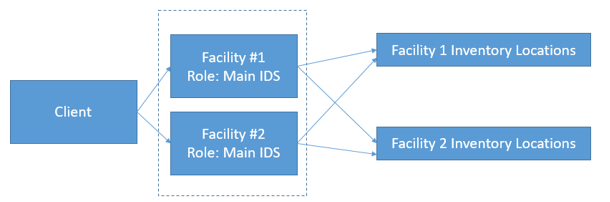
Scenario 1: Default Facility Group
All Facilities have a Main IDS role in the group.
|
Facility Group |
When a user is logged into: |
Can Receive into… |
Can Transfer between… |
Can Adjust between… |
Can Dispense from… |
Can record Temp Excursions from… |
Can perform Cycle Counts on… |
|
Default |
Facility #1 |
All Inventory Locations |
All Inventory Locations |
All Inventory Locations |
All Inventory Locations |
All Inventory Locations |
All Inventory Locations |
|
Default |
Facility #2 |
All Inventory Locations |
All Inventory Locations |
All Inventory Locations |
All Inventory Locations |
All Inventory Locations |
All Inventory Locations |
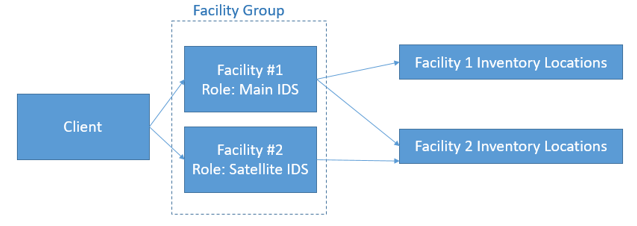
Scenario 2: One Main IDS, One Satellite IDS
In this scenario, the “Default” Facility Group has been edited so one Facility is the Main IDS, and one Facility is the Satellite. This can be managed in Application Administration: Edit Client and Facility Settings: Manage Facility Groups (located under “Client Items”). For this example, the role was clicked to switch Cancer Center Pharmacy from a Main IDS to a Satellite IDS.
|
Facility Group |
When a user is logged into: |
Can Receive into… |
Can Transfer between… |
Can Adjust between… |
Can Dispense from… |
Can record Temp Excursions from… |
Can perform Cycle Counts on… |
|
Default |
Facility #1 |
All Inventory Locations |
All Inventory Locations |
All Inventory Locations |
All Inventory Locations |
All Inventory Locations |
All Inventory Locations |
|
Default |
Facility #2 |
Facility #2 Inventory Locations |
Facility #2 Inventory Locations |
Facility #2 Inventory Locations |
Facility #2 Inventory Locations |
Facility #2 Inventory Locations |
Facility #2 Inventory Locations |
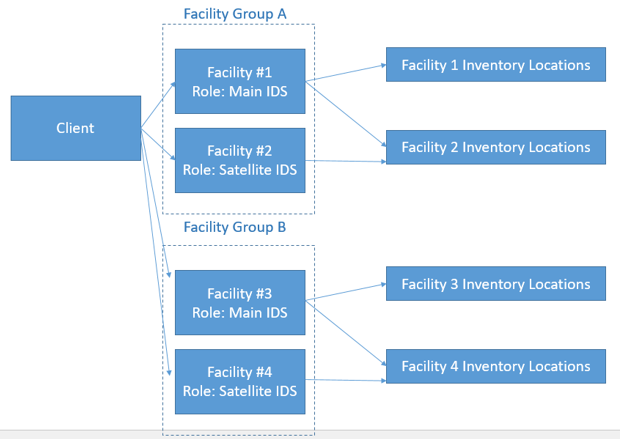
Scenario 3: Two Facility Groups where each has one Satellite IDs
In this scenario, we will add an additional Facility Group. This function must be done by McCreadie Group’s Support team to ensure it has been tested and is functioning correctly and there is no downtime for your site.
There are two Facility Groups below – and each has one Satellite IDS. In this Scenario, Facility #1 has access to all Inventory Locations in Facility Group A only, and Facility #3 has access to all Inventory Locations in Facility Group B only. The next scenario will address the cross-over.
|
Facility Group |
When a user is logged into: |
Can Receive into… |
Can Transfer between… |
Can Adjust between… |
Can Dispense from… |
Can record Temp Excursions from… |
Can perform Cycle Counts on… |
|
A |
Facility #1 |
All Inventory Locations in Group A |
All Inventory Locations in Group A |
All Inventory Locations in Group A |
All Inventory Locations in Group A |
All Inventory Locations in Group A |
All Inventory Locations in Group A |
|
A |
Facility #2 |
Facility #2 Inventory Locations |
Facility #2 Inventory Locations |
Facility #2 Inventory Locations |
Facility #2 Inventory Locations |
Facility #2 Inventory Locations |
Facility #2 Inventory Locations |
|
B |
Facility #3 |
All Inventory Locations in Group B |
All Inventory Locations in Group B |
All Inventory Locations in Group B |
All Inventory Locations in Group B |
All Inventory Locations in Group B |
All Inventory Locations in Group B |
|
B |
Facility #4 |
Facility #4 Inventory Locations |
Facility #4 Inventory Locations |
Facility #4 Inventory Locations |
Facility #4 Inventory Locations |
Facility #4 Inventory Locations |
Facility #4 Inventory Locations |
Scenario 4: Two Facility Groups with the same Main IDS in both
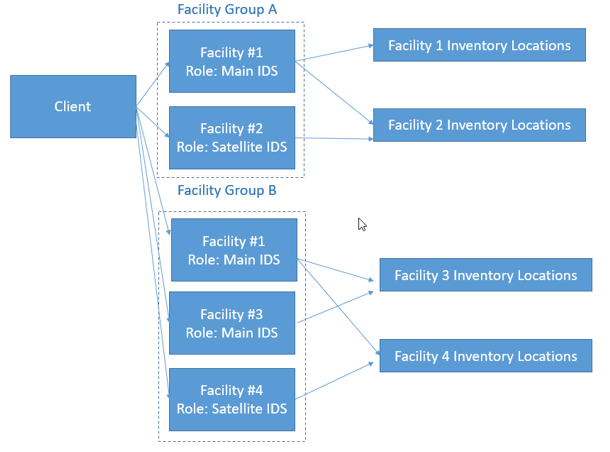
In this scenario, we have allowed Facility#1 to be the Main IDS for both Facility Groups. This allows Facility #1 to have access to all Inventory Locations across the site.
With this scenario, Facility Group rules can be reviewed:
- A Facility Group can contain multiple facilities with a Main IDS role.
Facilities with the Main IDS role simply have access to all inventory locations in the group.
- A Facility can be a Main IDS at multiple Facility Groups.
This allows a Facility to have a wider span of access to Inventory Locations across groups.
- A Facility cannot be both a Main IDS and a Satellite IDS across Facility Groups.
If a Facility were to be both Main IDS and Satellite across groups, access to inventory would be too complex to manage. A Satellite IDS is designed for a facility that has restricted, self-contained operations.
|
Facility Group |
When a user is logged into: |
Can Receive into… |
Can Transfer between… |
Can Adjust between… |
Can Dispense from… |
Can record Temp Excursions from… |
Can perform Cycle Counts on… |
|
A |
Facility #1 |
All Inventory Locations in Group A |
All Inventory Locations in Group A |
All Inventory Locations in Group A |
All Inventory Locations in Group A |
All Inventory Locations in Group A |
All Inventory Locations in Group A |
|
A |
Facility #2 |
Facility #2 Inventory Locations |
Facility #2 Inventory Locations |
Facility #2 Inventory Locations |
Facility #2 Inventory Locations |
Facility #2 Inventory Locations |
Facility #2 Inventory Locations |
|
B |
Facility #1 |
All Inventory Locations in Group B |
All Inventory Locations in Group B |
All Inventory Locations in Group B |
All Inventory Locations in Group B |
All Inventory Locations in Group B |
All Inventory Locations in Group B |
|
B |
Facility #3 |
All Inventory Locations in Group B |
All Inventory Locations in Group B |
All Inventory Locations in Group B |
All Inventory Locations in Group B |
All Inventory Locations in Group B |
All Inventory Locations in Group B |
|
B |
Facility #4 |
Facility #4 Inventory Locations |
Facility #4 Inventory Locations |
Facility #4 Inventory Locations |
Facility #4 Inventory Locations |
Facility #4 Inventory Locations |
Facility #4 Inventory Locations |