
Sites can optionally choose on if they want to have a Quality Check completed against certain transactions. This is separate from a Shipment Receive Verification for receipts.
Sites are responsible for determining who can perform quality checks. Users must have the associated Quality Check permission to perform a Quality Check.
Transactions that utilize quality checks will appear in a facility alert for a user to resolve.
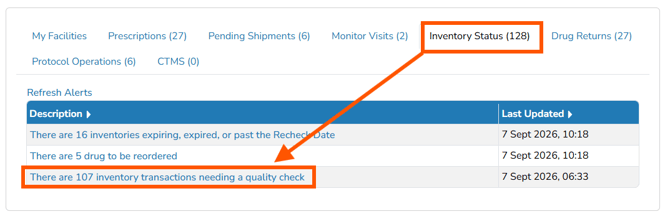
Users have to select line items and confirm or reject the transaction. The Details link provides more information about each transaction
Permissions Needed
AdminMain – Access the application administrative menu
EditClientandFacilitySettings - Along with AppAdmin, this permission should enable/disable the "Edit Client and Facility Settings" page
FacilityEdit - Along with AppAdmin and EditClientandFacilitySettings access, this permission should enable/disable to view/edit facilities located under "Edit Client and Facility Settings" page
Users must have a role that has the FacilityEdit permission in the facility to make any modifications.
InventoryQualityCheck - Ability to view the inventory quality check under the Inventory Status alert. This permission is only required to complete the quality check.
Enabling Quality Checks
- Navigate to Application Administration
- Click on Edit and Client Facility Settings
- Click on View/Edit on the appropriate facility
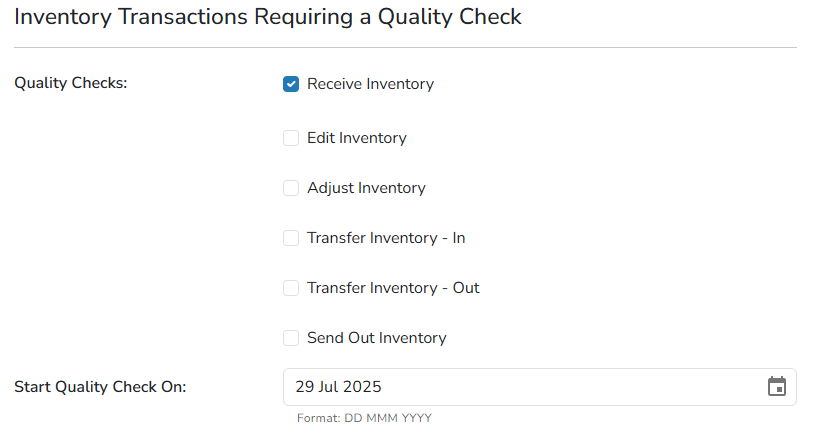
- Check the flags for the transactions you want quality checks performed on
- Set a start date
It is recommended to establish a start date on or near the date you are making this change. If you do not set the date correctly, the alert will pull in all previous transactions for quality checks.
- Click Save
Disabling Quality Checks
- Navigate to Application Administration
- Click on Edit and Client Facility Settings
- Click on View/Edit on the appropriate facility
- Uncheck the flags for the transactions you no longer want quality checks on
- Do not modify the start date.
If you are only disabling Quality Checks on one transaction type, leave the start date as it was.
- Click Save