
Vestigo includes a set of standard Patient/Subject Unenrollment Reasons that can be used when unenrolling patients/subjects from a protocol. The reasons are visible on the Patient Enrollment History report.
- Add an Unenrollment Reason
- Modify an Unenrollment Reason
- Inactivate an Unenrollment Reason
- Reactivating an Unenrollment Reason
- Deleting an Unenrollment Reason
Permissions Needed
AdminMain – Access the application administrative menu
EditClientandFacilitySettings - Along with App Admin, this permission should enable/disable the "Edit Client and Facility Settings" page
PatientUnenrollment Reasons - Application Administration > Edit Client and Facility Settings > Patient Unenrollment Reasons. Ability to manage Patient Unenrollment Reasons
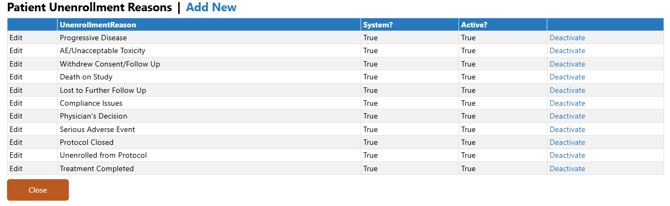
Standard Vestigo Patient/Subject Unenrollment Reasons
Vestigo provides these reasons roles for every client. The reason names cannot be modified by site users, but they can be inactivated.
Progressive Disease
AE/Unacceptable Toxicity
Withdrew Consent/Follow Up
Death on Study
Lost to Further Follow Up
Compliance Issues
Physician's Decision
Serious Adverse Event
Protocol Closed
Unenrolled from Protocol
Treatment Completed
Adding a Patient/Subject Unenrollment Reason
- Navigate to Application Administration
- Click on Edit and Client Facility Settings
- Click on Patient Unenrollment Reasons under Client Settings on the right side
- Click on Add New
- Enter the description of the new Patient Unenrollment Reason
- Leave the Is Active flag checked
- Click Save
Editing a Patient/Subject Unenrollment Reason
Site users have limited modification ability on system generated roles and are limited to deactivating them. System generated reason names cannot be edited.
Once a site has used a site created reason, you can no longer edit the reason name.
- Navigate to Application Administration
- Click on Edit and Client Facility Settings
- Click on Patient Unenrollment Reasons under Client Settings on the right side
- Click on Edit for the reason you wish to edit
- Make the appropriate modifications to the role as needed
- Click Save
Inactivating a Patient/Subject Unenrollment Reason
Inactivating a patient unenrollment reason does not impact historical information but will prevent users from being able to use the reason on future unenrollment's.
- Navigate to Application Administration
- Click on Edit and Client Facility Settings
- Click on Patient Unenrollment Reasons under Client Settings on the right side
- Click on Deactivate for the reason you wish to inactivate
- Click Ok to confirm the modification
Reactivating a Patient/Subject Unenrollment Reason
- Navigate to Application Administration
- Click on Edit and Client Facility Settings
- Click on Patient Unenrollment Reasons under Client Settings on the right side
- Click on Activate for the reason you wish to reactivate
- Click Ok to confirm the modification
Deleting a Patient/Subject Unenrollment Reason
Site users can delete a reason, if the reason has never been used. If the reason has been used, you can only inactivate the reason.
- Navigate to Application Administration
- Click on Edit and Client Facility Settings
- Click on Patient Unenrollment Reasons under Client Settings on the right side
- Click on Delete for the reason you wish to delete
- Click Ok to confirm the modification