
Required Permissions and Prerequisites
Users must be able to edit Protocols and Protocol Orders.
The site must also be contract for the EHR interface integration.
EHR Configurations
If your site is contracted for the EHR interface, you can utilize incoming EHR messages to help process dispenses. This article walks users through the process of mapping EHR identifiers to unique Vestigo orders.
EHR identifiers should be unique to single Vestigo orders, but there are certain cases where the EHR identifier should be added to multiple Vestigo orders.
The first step in the integration is establishing the link from the EHR to Vestigo. To do this, an EHR MedID will be associated with one or more Vestigo Order Builds in the “Manage EMR Interface Drugs” field. Which MedID to use will depend on how the protocol has been configured in Vestigo.
To accommodate the various workflows in the EHR, multiple Vestigo Order Builds can be associated with one EHR MedID and one Vestigo Order Build can be associated with multiple EHR MedIDs. In addition, the user will be presented with a grid of information about the patient’s current enrollment to aid in decision-making.
Configuration #1 – IDS is unblinded in a blinded trial
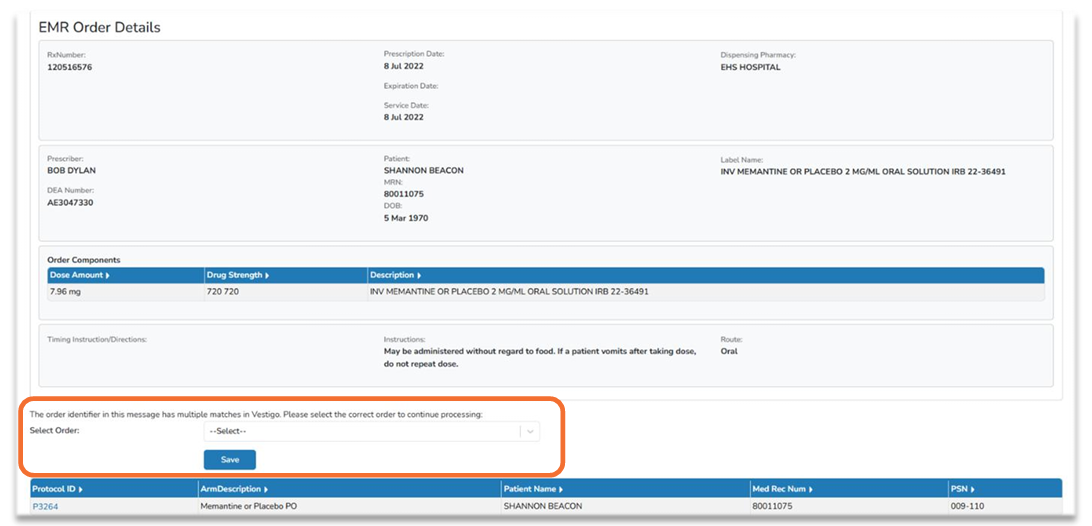
The EHR may have the drug named “Drug A or Placebo”, while in Vestigo there will be a separate Order Build for the drug and placebo. In this case, the single EHR MedID will be added to both Vestigo Orders.
When processing a dispense, the user will be presented with a drop-down to choose which order they are fulfilling against, drug or placebo.
Configuration #2 – One EHR drug, multiple Vestigo orders by dosage
In this situation, the EHR drug may be generic, without a specific strength, such as “Drug A”, while Vestigo may have an Order Build for “Drug A 10 mg”, “Drug A 20 mg”, “Drug A 30 mg”, etc. In this case, the single EHR MedID will be added to each Vestigo order build.
When processing a dispense, the user will be presented with a drop-down to choose which order they are fulfilling against.
It is possible to have one Vestigo Order Build with all strengths of Drug A. In this case, please add the single EHR MedID to the single Vestigo order build.
Configuration #3 – Two or more EHR drugs, one Vestigo Order
In the case, where there are multiple EHR drugs, and one Vestigo Order Build with all of the drugs on it, each EHR MedID can be associated with the single Vestigo order.
When processing a dispense, the prescription will be automatically associated with that order.
Mapping Vestigo Orders
- Navigate to the protocol
- Click on Edit Protocol
- Click on the Drugs and Orders tab
- Click Edit for the protocol order you want to add a mapping to
- The page should expand for the order, and users can then Click on Manage EMR Interface Drugs
- A pop up window will appear. Click on Add New
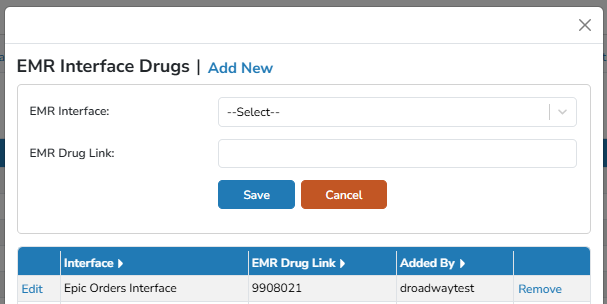
- From the EMR Interface drop down menu, select the interface.
Sites may have more than one interface and are typically defined as Inpatient and Outpatient.
- In the EMR Drug Link, enter the appropriate identifier.
- For inpatient, this is usually the ERx ID or the IID.
- For outpatient, this is usually an NDC number.
- If you are unsure, you will want to consult with your EHR team.
- Click Save