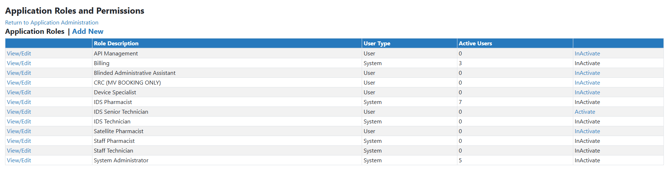
Vestigo comes standard with 6 default application roles which can be assigned to a user in a facility. A user may have a combination of roles between facilities such as Billing in IDS Pharmacy but not Park IDS Pharmacy. Each role has a permission set that is associated with that role.
In some situations, sites may need to modify an application role by changing the name of user created roles or by adding/removing permissions from an application role.
Permissions Needed
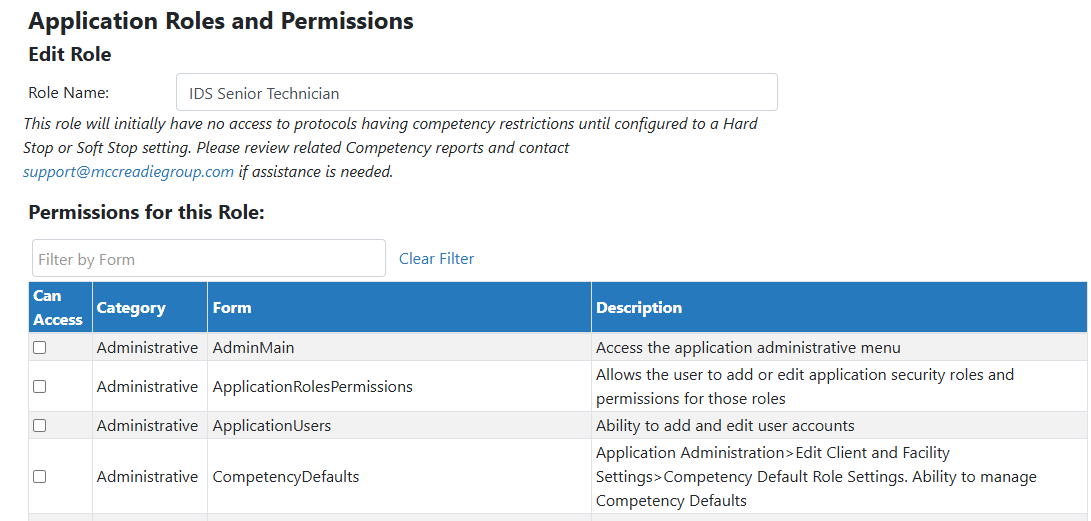
AdminMain – Access the application administrative menu
ApplicationRolesPermissions - Allows the user to add or edit application security roles and permissions for those roles
Modifying an Application Role
Users cannot modify the name of system generated roles.
- Hover your mouse over Main at the top right of the screen and click on Application Administration
- Click on the Manage Application Roles and Permissions under User Accounts and Security
- Click on View/Edit for the role you want to modify
- If user generated role and wanting to modify the name, you can modify the name
- Add or remove the permissions that will be allowed for this role by checking/unchecking the permissions
- Adjust when a user can perform quality checks, if appropriate
If your site does not utilize Quality Checks, then you can skip this section and leave as the defaults.
- Click Save