
Some circumstances require System Administrators to modify existing accounts. Keep in mind that it is not appropriate to modify an account to repurpose the account for another user. User accounts are unique to an individual user and is considered that user's signature. You should only modify the account for spelling errors or email updates.
- Modifying an Account Email
- Modifying an Account Username
- Modifying an Account Contact Record Name
- Adding or Removing Roles
Permissions Needed
AdminMain – Access the application administrative menu
ApplicationUsers - Ability to add and edit user accounts
Modifying an Account Email
If your site uses Single Sign On, modifying the account email can break authentication.
- Hover your mouse over Main at the top right of the screen and click on Application Administration
- Click on the Add/Edit User Accounts under User Accounts and Security
- Locate the user and Click on Edit.
- Click on Edit Email.
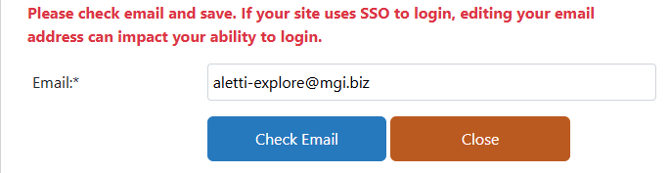
- Enter the new email and click Check Email to check if the email already exists to another contact.
- If no duplicate record was found, click Save
If you get an error during the duplicate email check, please check your address book to make sure the email was not entered under a different user. It may be appropriate to modify the duplicated contact record to different email.
Modifying an Account Username
This will retroactively update all transactions where the username appears from a recorded transaction.
- Hover your mouse over Main at the top right of the screen and click on Application Administration
- Click on the Add/Edit User Accounts under User Accounts and Security
- Locate the user and Click on Edit.
- Click on Edit UserName.
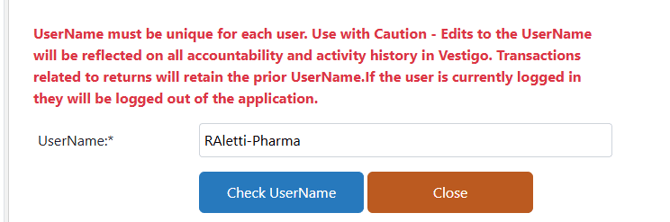
- Enter the new Username and click Check UserName to check if the Username already exists.
- If no duplicate record was found, click Save.
If you get an error during the duplicate email check, please check other user accounts to find the duplicate. You may have to check inactive users.
Modifying an Account Contact Record Name
Caution: This will retroactively update all reports where the full name is displayed.
Every Vestigo user must be linked to a contact created by the site in the Address Book. If you need to update a name, please refer to this article.