
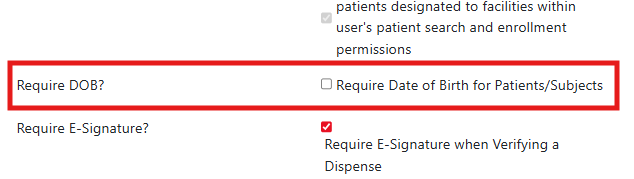
When patients or subjects are entered into Vestigo, users can enter in the date of birth for that patient. By default, the date of birth is not a required field in Vestigo. However, site's can choose to require the Date of Birth be entered at time of patient entry into the master record.
Required Permissions
AdminMain - Access the application administrative menu
EditClientandFacilitySettings - Along with AppAdmin and EditClientandFacilitySettings access, this permission should enable/disable Ability to edit client information under "Edit Client and Facility Settings" page.
Enabling Date of Birth Requirement
- Navigate to Application Administration
- Click on Edit and Client Facility Settings
- Scroll down and click on the check box for Require Date of Birth for Patients/Subjects
- Scroll down and click Save
If this was enabled after patient/subject data was entered, users will be required to add the DOB when they edit the patient master record. You will still be able to enroll subjects into protocols without the DOB.
Disabling Date of Birth Requirement
- Navigate to Application Administration
- Click on Edit and Client Facility Settings
- Scroll down and click on the uncheck box for Require Date of Birth for Patients/Subjects
- Scroll down and click Save