
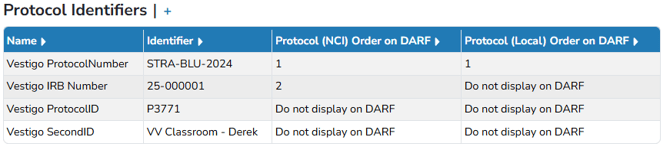
Users can create site-specific identifiers (such as Vestigo Protocol Number, SecondID, ThirdID, IRB#, NCI#) choose which appear on the Accountability Log, and set their display order. These identifiers help users find protocols in Vestigo and manage how they show up on the DARF.
Required Permissions
ProtocolManagement – Allows a user to have the “Edit Protocol” option and access to the Main tab
ProtocolSnapshot – Ability to view the Summary page of a Protocol (Protocol Snapshot)
The Protocol Identifiers grid can be expanded or collapsed by using the “+/-”. When collapsed, only the site-specific identifiers will be displayed. Duplicated and non-site-specific identifiers will not be displayed.
For more information on where each identifier displays on which DARF, users can hover over the headers of the columns “Protocol (NCI) Order on DARF” and “Protocol (Local) Order on DARF” or see the table below. You can view the last section of this document for examples.
|
Format of DARF |
Protocol (NCI) Order will display on DARF in FIELD: |
Protocol (Local) Order will display on DARF in FIELD: |
|
NCI |
NCI Protocol No |
n/a |
|
NCI Oral |
NCI Protocol No |
Local Protocol No |
|
IDS |
Protocol Number |
n/a |
|
IDS Oral |
Protocol Number |
Local Protocol No |
|
ACTG |
Protocol Number |
n/a |
|
Generic Lot Number Specific Log |
Protocol Number |
n/a |
|
Single Subject DARF |
n/a |
Local Protocol Number |
|
Summary-Lot Number |
Protocol Number |
n/a |
Types of Protocol Identifier
Vestigo allows for multiple identifiers that the site can use. However, it is recommended to utilize these consistently across all protocols.
|
Vestigo ProtocolNumber |
This field is designed to be used for the official protocol number as supplied by the sponsor. Some sites elect to override this with an IRB or other local number. |
|
Vestigo IRB Number |
If your site has a local IRB number, this identifier can be used to enter that number. |
|
Vestigo NCTID |
The NCT Number used from ClinicalTrials.gov. See the last section of this manual for more information. |
|
Vestigo SecondID |
An optional second identifier may be populated in the grid. Sites can use the field for a local identifier if needed. |
|
Vestigo ThirdID |
An optional third identifier may be populated in the grid. Sites can use the field for a local identifier if needed. |
|
CTMS ProtocolNumber |
This identifier will only appear if you are contracted for a CTMS interface and is the value you enter to link the protocol to your site’s CTMS. The number must be an exact match to what's listed as the protocol number in your CTMS.
The name may vary slightly depending on what CTMS is used at your site. |
Adding or modifying a Protocol Identifier
Identifiers are added to the Protocol Identifiers grid when creating a protocol through ClinicalTrials.gov or CTMS, if available. Identifiers can be modified or added when editing the protocol using the following steps:
- Go to the Protocol.
- Click the Edit Protocol button.
- Add or edit the identifiers.
- Enter a number to indicate the order in the “Protocol (NCI)” or “Protocol (Local)” fields.
- Click the Save button.
Adding or Modifying NCT or CTMS Protocol Identifiers
At times, studies need to be added to Vestigo prior to certain identifiers being available. Whether that is a NCT (ClinicalTrials.gov) or CTMS (Clinical Trial Management System) Protocol Number, users can add or update these identifiers directly on the protocol.
Please note: If your study is linked to CTMS and the NCT is incorrect, ensure that the correct CTMS identifier is entered first. Once the correct CTMS identifier is applied, contact your designated CTMS representative to confirm that the NCT will be updated appropriately. Should you modify the NCT, the CTMS interface will reflect this change. If the CTMS identifier on the study is in error, consider updating it accordingly. Always review your CTMS system prior to making any modifications.
Adding or Modifying the NCT Number
The NCT number can be added or edited easily.
To modify the NCT Number
- On the study, select Edit Protocol
- Select Edit to the left of the NCT identifier field.
- Enter the new NCT Number
- Click on Save
- Click on Update from Clinical Trials
To add an NCT Number
- On the study, select Edit Protocol
- Select Add Protocol Identifier at the top of the identifier grid
- From the dropdown, select NCTID
- Enter the NCT Number
- Click on Save
- Click on Update from Clinical Trials
Whether adding or modifying, the Clinical Trials Primary Number will update but the user must select Save at the bottom of the Main tab to fully implement the updates to the title and other fields. Users will need to manually update the Vestigo Protocol Number, as needed.
Adding or Modifying the CTMS Identifier
When adding or modifying the CTMS identifier, the study link to the CTMS will be updated as long as the user is using the correct CTMS Identifier. The CTMS Identifier used must match the Identifier in your CTMS to correctly link the protocol.
To modify the CTMS Identifier
- On the study, select Edit Protocol
- Select Edit to the left of the CTMS identifier field
- Enter the correct identifier
- Click on Save
- Click on Update from CTMS
To add an CTMS Identifier
- On the study, select Edit Protocol
- Select Add Protocol Identifier at the top of the identifier grid
- From the dropdown, select the CTMS Protocol Number (for example, Oncore Protocol Number)
- Enter the CTMS Number
- Click on Save
- Click on Update from CTMS
When a CTMS identifier is added or modified and “Update from CTMS” is selected in the Protocol Identifiers grid, relevant identifiers are incorporated, and the title, sponsor, status, and phase are synchronized accordingly. The interface continues to update protocol, contact, and subject information throughout the day. To finalize changes to the title and other fields, users must select Save at the bottom of the Main tab. Manual updates to the Vestigo Protocol Number should be performed by users as required.
Protocol Identifiers on the DARF
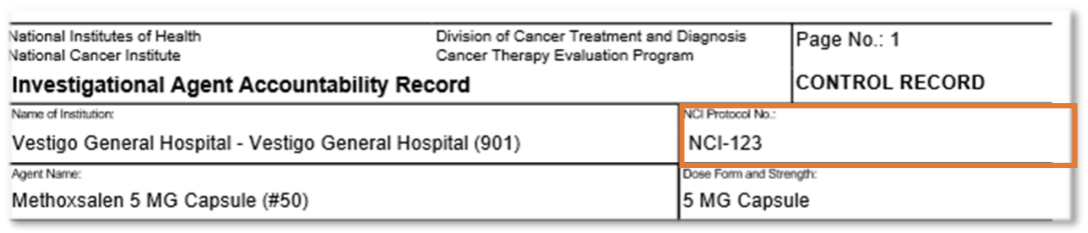
NCI
The NCI displays the Protocol (NCI) Order in the “NCI Protocol No” field.
NCI Oral
The NCI Oral displays:
- the Protocol (NCI) Order in the “NCI Protocol No” field
- the Protocol (Local) Order in the “Local Protocol No” field

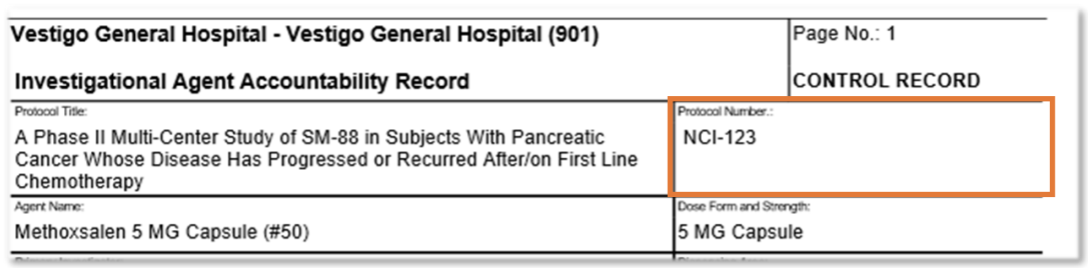
IDS
The IDS displays the Protocol (NCI) Order in the “Protocol Number” field.
IDS Oral
The IDS Oral displays:
- the Protocol (NCI) Order in the “Protocol No” field
- the Protocol (Local) Order in the “Local Protocol No” field

ACTG
The ACTG displays the Protocol (NCI) Order in the “Protocol Number” field.
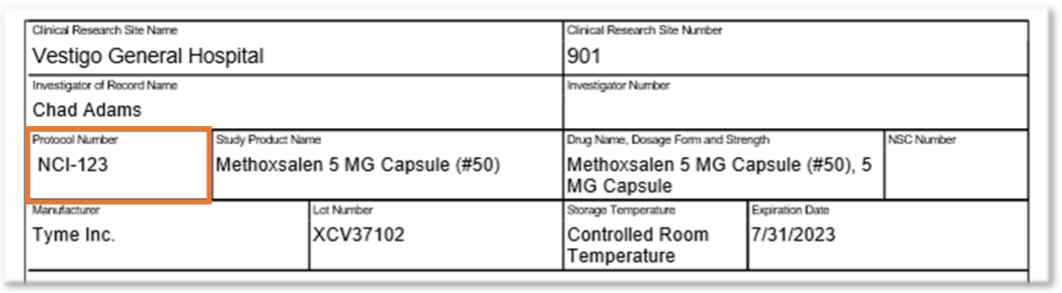
Generic Lot Number Specific Log
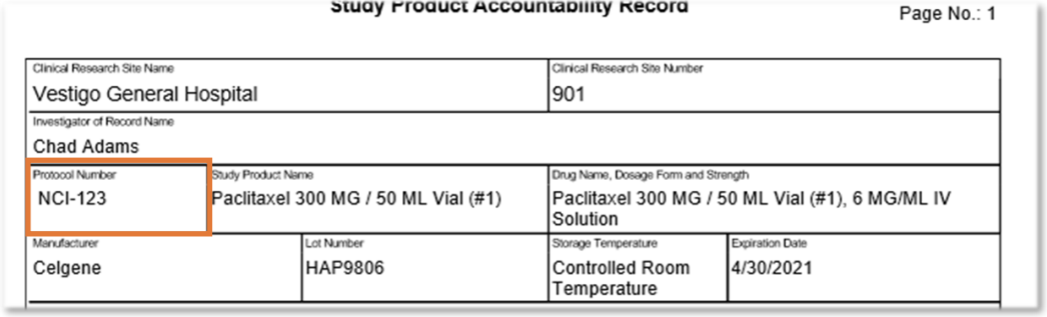
The Generic Lot Number Specific Log displays the Protocol (NCI) Order in the “Protocol Number” field.
Single Subject DARF
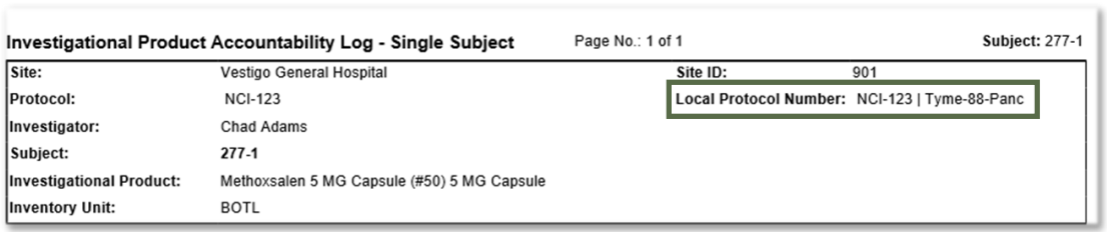
The Single Subject DARF displays the Protocol (Local) Order in the “Local Protocol Number” field
Summary Lot Number
The Summary Lot Number displays the Protocol (NCI) Order in the “Protocol Number” field.
