
This setting configures the default values for the local tab of all new Protocol builds. By design, the option to set yes or no to Protocol Requires Inventory Tracking by Ordering Investigator is not included in the available defaults as users must choose this setting after editing the newly created protocol.
The Client-level Print Subject Initials on DARF setting is a master override. If it is unchecked, no additional selections can be made in the facility settings. If it is checked, it can be overridden at the Facility and Protocol-level.
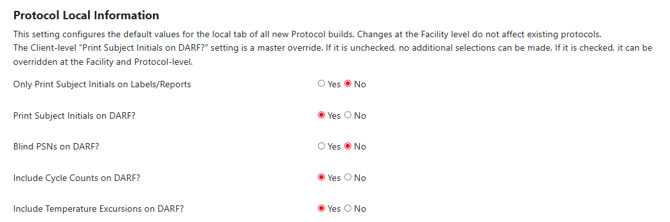
Modifying these options do not impact already created protocols. It will only set the defaults on newly created protocols in the facility going forward.
Permissions Needed
AdminMain – Access the application administrative menu
EditClientandFacilitySettings - Along with AppAdmin, this permission should enable/disable the "Edit Client and Facility Settings" page
FacilityEdit - Along with AppAdmin and EditClientandFacilitySettings access, this permission should enable/disable to view/edit facilities located under "Edit Client and Facility Settings" page
Users must have a role that has the FacilityEdit permission in the facility to make any modifications.
Modifying Protocol Local Information Defaults for a Facility
- Navigate to Application Administration
- Click on Edit and Client Facility Settings
- Click on View/Edit on the appropriate facility
- Make the appropriate changes to the Protocol Local Information Defaults flags
- Click Save