
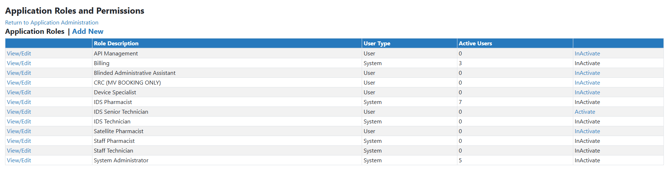
Vestigo comes standard with 6 default application roles which can be assigned to a user in a facility. A user may have a combination of roles between facilities such as Billing in IDS Pharmacy but not Park IDS Pharmacy. Each role has a permission set that is associated with that role.
In some situations, sites may have inactivated a custom application role, but may have found another need for the site custom role.
Permissions Needed
AdminMain – Access the application administrative menu
ApplicationRolesPermissions - Allows the user to add or edit application security roles and permissions for those roles
Reactivating an Application Role
- Hover your mouse over Main at the top right of the screen and click on Application Administration
- Click on the Manage Application Roles and Permissions under User Accounts and Security
- Click on Reactivate for the role you want to inactivate