
If recorded workload needs to be adjusted, Vestigo makes it easy for users to update existing entries. Users can quickly modify time values or make other necessary changes to ensure workload data remains accurate and up to date. Users can also remove recorded workload if necessary.
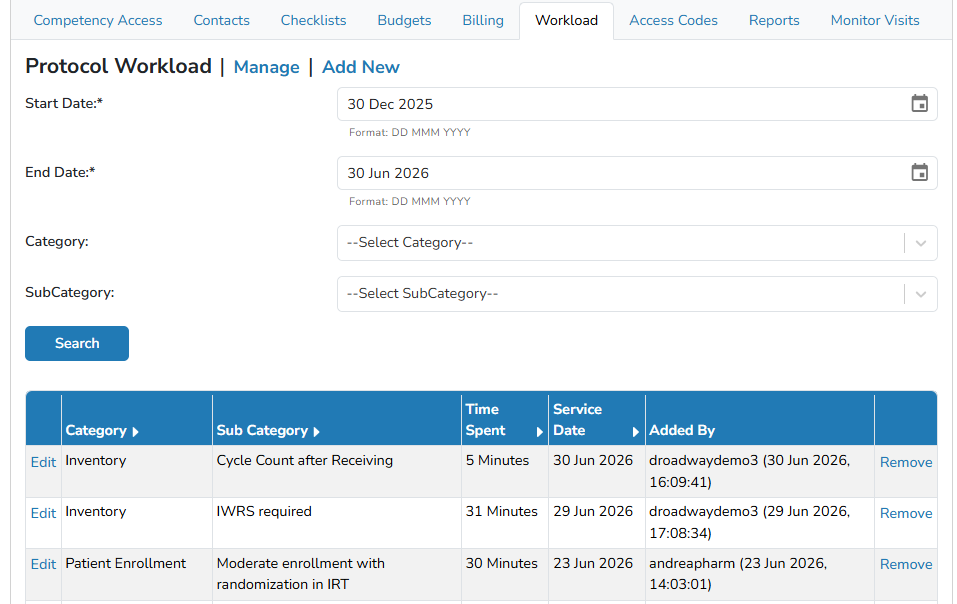
Editing A Recorded Workload
Modifying time values on a recorded workload only impact that recorded workload line item.
- Navigate to the protocol
- Click on the Workload tab
- Locate the recorded workload and click on Edit
You may have to adjust the filters to locate the workload,
- Users can modify the Workload Category, Subcategory, Time Value, or Service Date
- Click the blue Save button
Deleting A Recorded Workload
Deleting a recorded workload is permanent and cannot be reversed.
- Navigate to the protocol
- Click on the Workload tab
- Locate the recorded workload and click on Edit
You may have to adjust the filters to locate the workload,
- Click on the Remove link
- Users will need to confirm the removal by click the blue Confirm button