
This tab of information is only available when the user has the role of Study Coordinators with Returns on the protocol. This tab allows for the user to enter participant returns for each dispense that was returned to the Study Coordinator.
- Any return entered by a Study Coordinator with Returns can be authorized and/or cosigned by an external monitor as any other prescription return.
- Any movement of that return from Returns to a disposition of Destroyed or Returned to Sponsor can only be done by a Vestigo IDS Pharmacy user.
- Any edits or deleting a prescription return, can only be done by a Vestigo IDS Pharmacy user.
Study Coordinators with Returns (SCR) will have an additional tab of information called “Patient Dispenses” displayed on the protocols where they have this role. 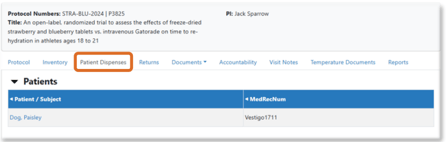 For those protocols where they are only a Study Coordinator, this tab will not be available.
When they select a patient listed on this screen, all prescriptions will be displayed below, including all prescriptions where returns have been entered.
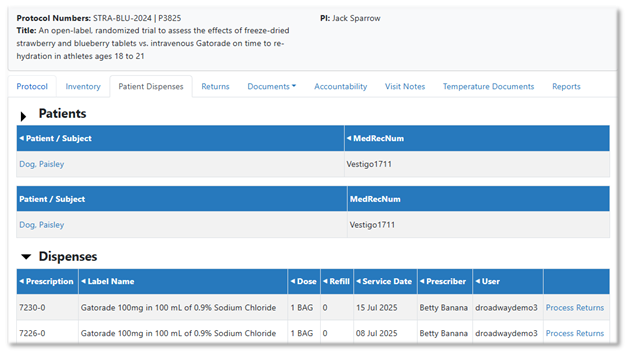
To record a return, click on Process Returns and enter the appropriate information for each item returns. If the inventory is itemized, the Item number will appear in the Lot number field as Lot#-ItemNumber. The only field that requires entry is the Return Quantity.
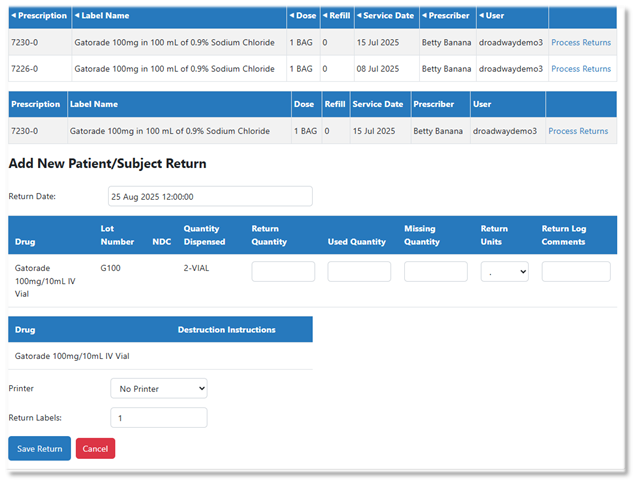
Caution - An SCR can record a return for any prescription regardless of previous entries. To prevent duplicate records, it is recommended to check the “Returns” tab for returns already entered by themselves or others.
To check which returns have been entered, the SCR accesses the “Returns” tab, selects the appropriate drug, and reviews each disposition tab; returns, destroyed, and return to sponsor, to determine which prescriptions are already recorded. Because a prescription may include multiple inventories, it is advisable to verify both the prescription number and the associated inventory when assessing returns. If a return is processed for one inventory, submitting a return for another inventory under the same prescription will not be considered a duplicate.