
If you have sent inventory to quarantine for any reason but now need to return inventory to usable stock, this can be achieved with a few clicks from the IDS site.
Note - This article covers Returning inventory to Stock from Quarantine. The return transaction will be visible on the DARF as another line item. This is the most common method of returning inventory to stock. If you need to delete a return, please view this article.
- Navigate to the Protocol
- Click on the Inventory Tab
- Click on Items in Quarantine
- Check each item in quarantine that you want to return to stock
- Click on Return from Quarantine
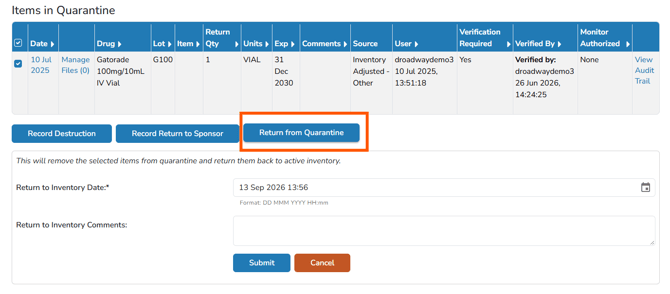
- Adjust the Return to Inventory Date, if needed
- (Optional) Enter any Return to Inventory Comments related to this return.
Tip - It is recommended being as descriptive in possible in this comment.
- Click the blue Submit button
Once submitted, the inventory will be moved back to the usable stock for further transactions.