
The Temperature Documents section allows users to review and download temperature documents relating to where inventory has been stored on this protocol. This allows study teams or other internal users to download the temperature documents for review
Tip - While users can download files with this role, they should be for personal review only. Consult with the local IDS pharmacy prior to sending any downloaded Vestigo form to anyone else.
McCreadie Group recommends sites utilize year long temperature storage locations, but each site may follow their own standard for Temperature Storage Locations.
On the Temperature Documents tab, Protocol Specific Users can apply a date or location filter to help narrow their search. Each line item in the search result may contain multiple files. You may have to search a variety of locations to gather the required information.
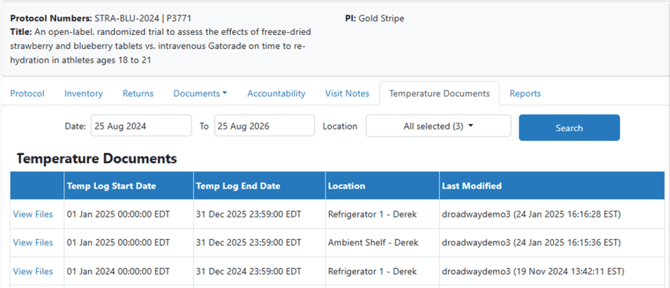
Once the correct temperature storage location has been located, you can click View Files. You will see files that were uploaded into one of five different categories of Temperature document. Users can click View to view or download the document.
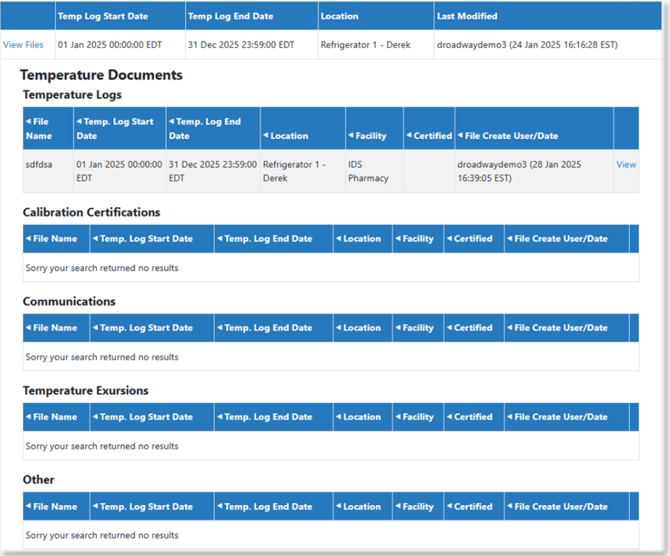
Tip - If users do not see an inventory location, that means that inventory has never been stored in the location or the IDS pharmacy has not uploaded temperature data to that location.
All temperature document related questions and inquiries should be directed to the local IDS pharmacy.