
One step further into Application Administration is the Vestigo Security Reports section. These reports support compliance, audit-ready documentation, and internal review by providing visibility into user access, role assignments, account changes, login activity, patient record access, and report download history.
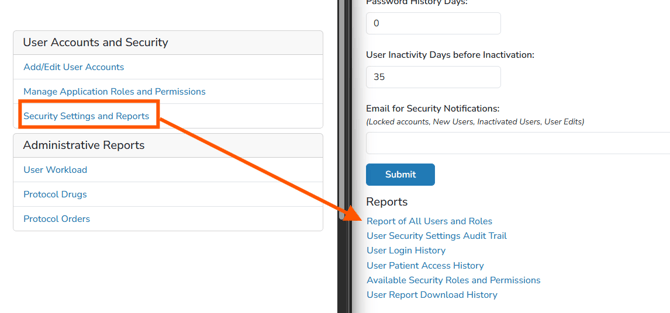
| Report | Description | File Format |
| Report of All Users and Roles |
The All Users and Roles Report will show all user accounts, indicate if active or inactive, their username, and what roles the accounts currently have. The report is intended for reporting purposes only. Note - This report does not show facility roles that were previously assigned. |
|
| User Security Settings Audit Trail Report | The User Security Settings Audit Trail report allows you to select a user and see all the changes to the user’s Vestigo account. The report downloads as a PDF and is intended for reporting purposes only. | |
| User Login History Report | The User Login History report is designed as an audit log style report and is intended for internal review only. The report will show information relating to the user that logged in, including the time, and if the authentication was successful. | |
| User Patient Access History Report | The User Patient Access History Report is designed as an audit log style report and is intended for internal review only and helps comply with site PII protection policies. The report will show all participant records during the time specified. It will also display if the user only accessed the profile or performed another action. The following possible values can be displayed in the Page Viewed Column: View profile, Enter new prescription, Editing a prescription, Verify Prescription, and Second Verify. |
|
| Available Security Roles And Permissions Report | The Available Security Roles and Permissions Report downloads as a PDF and is a check mark based design. At the top of the report, it will display all Application Roles within each Vestigo, including custom roles. On the side, it displays each permission (aka Forms), along with their corresponding category. An X will be present in the line item for each role that has that permission. |
|
| User Report Download History Report |
The User Report Download History Report displays a record of reports generated and downloaded by a user within in a given time period. Note - This report does not show if files that were uploaded to or created in Vestigo. |
PDF Spreadsheet |