
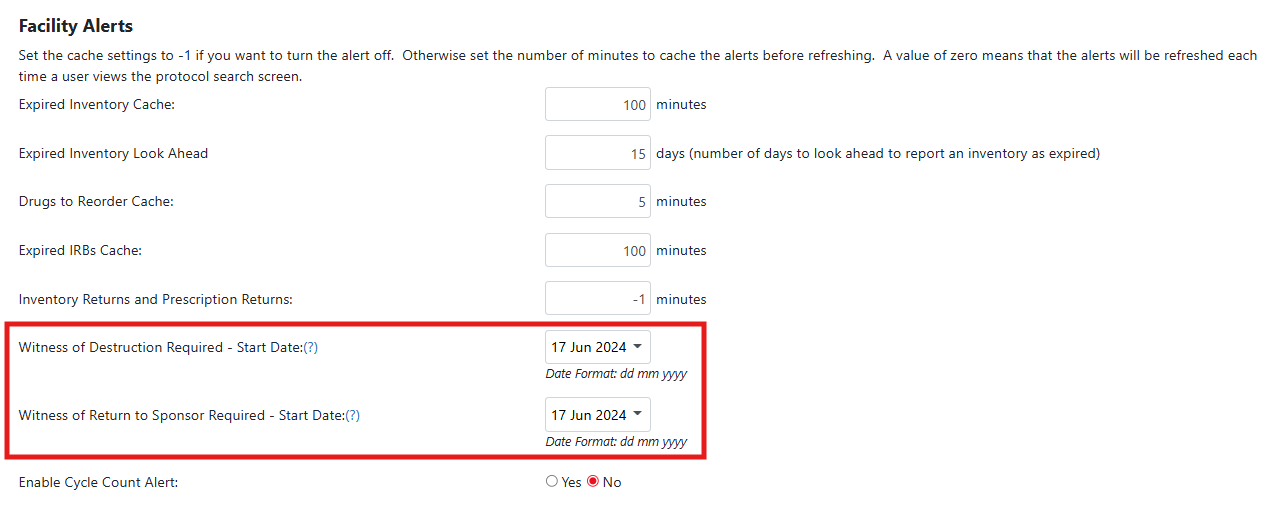
If the facility is working to implement witness requirements for either Destruction or Return to Sponsor, the site must set a date value here. If set, the alert will ignore all previous transactions that required the witness
If no value is set, the alert will pull in all past destructions or return to sponsor transactions where the drug build requires a witness.
Sites will usually set this when they are implementing the requirement across all drug builds in a facility on a certain date and perform a mass update to drug builds. When this occurs, the alert pulls in all previous destructions or returns, but the start date allows sites to filter out past transactions.
Permissions Needed
AdminMain – Access the application administrative menu
EditClientandFacilitySettings - Along with AppAdmin, this permission should enable/disable the "Edit Client and Facility Settings" page
FacilityEdit - Along with AppAdmin and EditClientandFacilitySettings access, this permission should enable/disable to view/edit facilities located under "Edit Client and Facility Settings" page
Users must have a role that has the FacilityEdit permission in the facility to make any modifications.
Setting Start Dates for Witness Requirements
- Navigate to Application Administration
- Click on Edit and Client Facility Settings
- Click on View/Edit on the appropriate facility
- Set a date value for Witness of Destruction Required - Start Date or Witness of Return to Sponsor Required - Start Date
- Click Save