
Sites can optionally enable Shipment Receipt Verification, which requires two users or an override for each shipment. This setting is can be set at the drug build level, but other settings can force the requirement for shipment receipt verification.
This article covers the creation of the Override Reasons that users can choose if they cannot verify the inventory receipt with another user. By default, there are no reasons provided, and sites must add the reasons manually.
Permissions Needed
AdminMain – Access the application administrative menu
EditClientandFacilitySettings - Along with App Admin, this permission should enable/disable the "Edit Client and Facility Settings" page
ManageShipmentReceiptVerificationOverrideReasons - Ability to create, edit, and delete Shipment Receipt Verification Override Reasons
Creating a Shipment Receipt Verification Override Reason
- Navigate to Application Administration
- Click on Edit and Client Facility Settings
- Click on Shipment Receipt Verification Override Reasons under Client Settings on the right side
- Click Add New
- Enter a name for the reason. This is visible in the application and on reports.
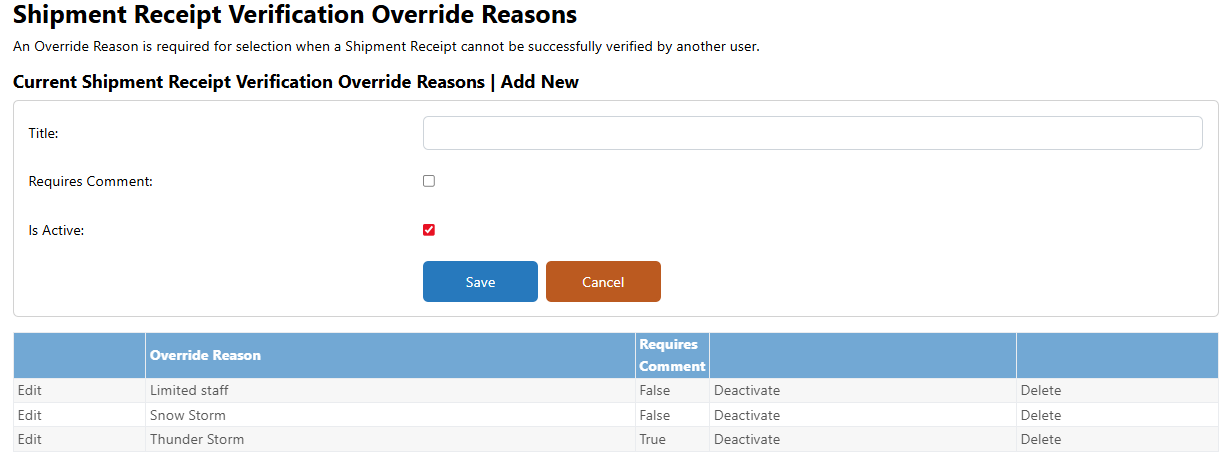
- If the site would like the overriding user to enter a comment about the override, they can check Requires Comment. If left unchecked, the comments section is option when overriding the verification.
- Leave the Is Active flag checked
- Click Save
Repeat this step as many times to add all the necessary reasons.
Editing a Shipment Receipt Verification Override Reason
Once an override reason has been used, you can no longer edit the reason.
- Navigate to Application Administration
- Click on Edit and Client Facility Settings
- Click on Shipment Receipt Verification Override Reasons under Client Settings on the right side
- Click Edit on the reason you wish to edit
- Apply the necessary changes
- Click Save
Inactivating a Shipment Receipt Verification Override Reason
Once a reason has been used, you can only inactivate the reason. Inactivating the reason prevents future use and does not impact historical transactions where the reason was used.
- Navigate to Application Administration
- Click on Edit and Client Facility Settings
- Click on Shipment Receipt Verification Override Reasons under Client Settings on the right side
- Click Deactivate on the reason you wish to inactivate
Reactivating a Shipment Receipt Verification Override Reason
- Navigate to Application Administration
- Click on Edit and Client Facility Settings
- Click on Shipment Receipt Verification Override Reasons under Client Settings on the right side
- Click Reactivate on the reason you wish to inactivate
Deleting a Shipment Receipt Verification Override Reason
Once a reason has been used, you can no longer delete the reason. There is no confirm screen when deleting a reason, and deletions are permanent.
- Navigate to Application Administration
- Click on Edit and Client Facility Settings
- Click on Shipment Receipt Verification Override Reasons under Client Settings on the right side
- Click Delete on the reason you wish to delete