
The Site Master is used to manage suppliers and send out sites across the client. In Vestigo, Send Out Sites are defined as external facilities or an internal facility that may not be using Vestigo, where a facility would ship inventory to with Inventory Send Out. When users access this module, they can add, edit, or delete send out site.
Adding a send out site can be done two ways. One from when a user creates a send out, or from App Admin. This article covers adding a send out site from App Admin.

Permissions Needed
AdminMain – Access the application administrative menu
SiteManager – Ability to manage sites for drug suppliers and sendout sites.
Adding a Send Out Site
- Hover your mouse over Main at the top right of the screen and click on Application Administration
- Click on Site Master under Client and Facility
- Ensure the SendOut Sites radio button is checked
- Click Add New
- Enter the name of the Supplier or Manufacturer as the Site Name
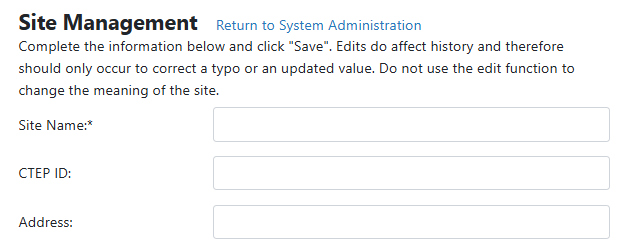
- It is recommended to add basic address information for this site as it will be required when a user selects the site during a send out
- Click Save
Modifying a Send Out Site
Editing a Send Out Site impacts historical records and should only be used to correct a typo. Users should not change the meaning of the site.
- Hover your mouse over Main at the top right of the screen and click on Application Administration
- Click on Site Master under Client and Facility
- Ensure the SendOut Sites radio button is checked
- Click Edit on the supplier you want to edit
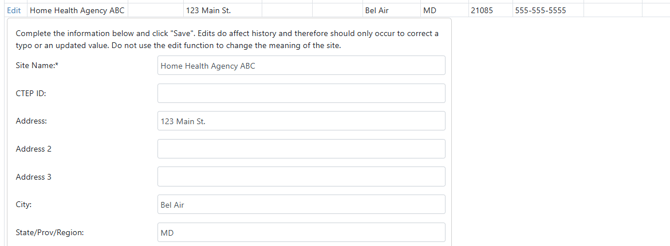
- Make the appropriate modifications as needed
- Click Save
Inactivating a Send Out Site
Deleting a Send Out Site will not impact historical records but will prevent that site from showing up as a selection for future inventory.
While the verbiage of this guide says delete, users are inactivating a Send Out Site and preventing future use. You will be unable to reactivate the supplier.
- Hover your mouse over Main at the top right of the screen and click on Application Administration
- Click on Site Master under Client and Facility
- Ensure the Drug Supplier radio button is checked
- Click Delete
- Click OK to confirm the deletion
