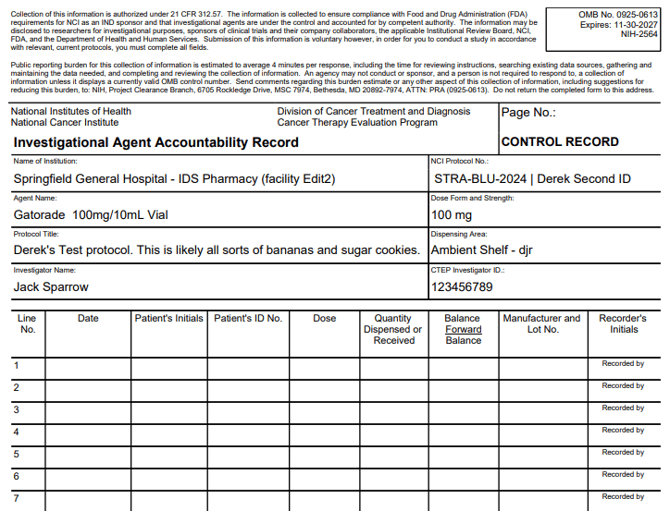
Vestigo allows the site to generate a Drug Accountability Record Form (DARF) in various formats to meet unique circumstances. In this article, we cover the types of DARFs that Vestigo allows users to generate.
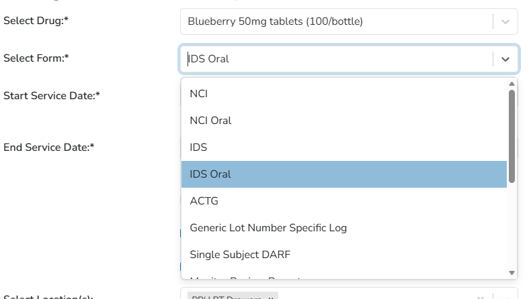
Contents
- NCI
- NCI Oral
- IDS
- IDS Oral
- PreClinical
- ACTG
- Generic Lot Number Specific Log
- Single Subject DARF
- Monitor Review Report
- Summary - Lot Number
- Blank Forms
NCI
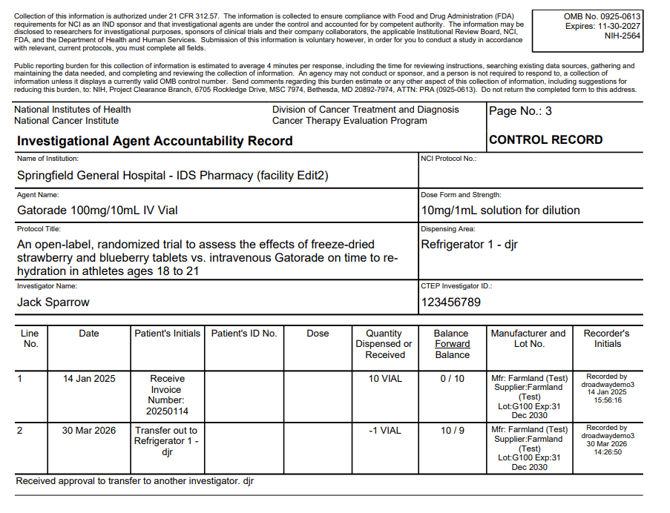
The NCI DARF is modeled after the NCI DARF template and uses the same expiration date for the form. It contains all information that would be present on a paper NCI DARF.
It is modeled after the most recent version of the form available on cancer.gov.
Key data points on this form:
- The Service Date may have an additional field to display the Rx Number under it.
- The patient's initials column can display shipment receipt invoice number, the patient initials, inventory locations, or Inventory Adjustment Reasons, depending on the type of transaction.
- Patient ID number displays the PSN for dispenses. It can also display for other transactions if the inventory is assigned to a participant.
- Item numbers appear in the Mfr/Lot column.
- If the lot number is 012345 and the Item number is 1337, it will appear as Lot: 012345-1337
- Accountability comments, inventory returns and edits, will appear underneath the associated transaction.
NCI Oral
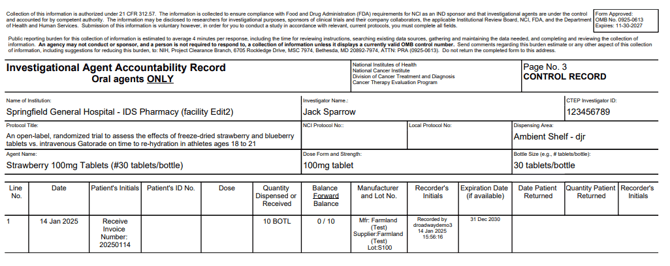
The NCI Oral DARF is modeled after the NCI Oral DARF template and uses the same expiration date for the form. It contains all information that would be present on a paper NCI DARF and is intended for Oral drug builds as it contains and additional field on the DARF: Bottle Size.
It is modeled after the most recent version of the form available on cancer.gov.
Key data points on this form:
- The Service Date can have an additional field to display the Rx Number under it.
- The patient's initials column can display shipment receipt invoice number, the patient initials, inventory locations, or Inventory Adjustment Reasons, depending on the type of transaction.
- Patient ID number displays the PSN for dispenses. It can also display for other transactions if the inventory is assigned to a participant.
- Item numbers appear in the Mfr/Lot column.
- If the lot number is 012345 and the Item number is 1337, it will appear as Lot: 012345-1337
- Accountability comments, inventory returns and edits, can appear underneath the associated transaction.
- Patient Returns can appear on the right side of the dispense transactions.
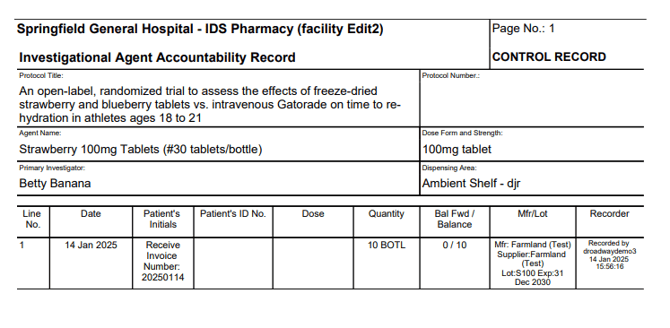
IDS
The IDS DARF is modeled after the NCI DARF template, but it does not contain the information at the top of the DARF for NCI protocols. This is the intended DARF for non-NCI protocols.
Key data points on this form:
- The Service Date may have an additional field to display the Rx Number under it.
- The patient's initials column can display shipment receipt invoice number, the patient initials, inventory locations, or Inventory Adjustment Reasons, depending on the type of transaction.
- Patient ID number displays the PSN for dispenses. It can also display for other transactions if the inventory is assigned to a participant.
- Item numbers appear in the Mfr/Lot column.
- If the lot number is 012345 and the Item number is 1337, it will appear as Lot: 012345-1337
- Accountability comments, inventory returns and edits, will appear underneath the associated transaction.
IDS Oral
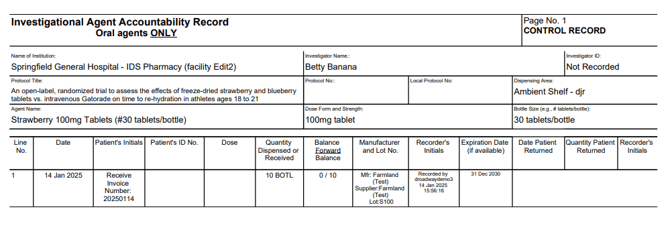
The IDS DARF is modeled after the NCI Oral DARF template, but it does not contain the information at the top of the DARF for NCI protocols. It contains all information that would typically be present on a paper DARF and is intended for Oral drug builds as it contains and additional field on the DARF: Bottle Size.
Key data points on this form:
- The Service Date can have an additional field to display the Rx Number under it.
- The patient's initials column can display shipment receipt invoice number, the patient initials, inventory locations, or Inventory Adjustment Reasons, depending on the type of transaction.
- Patient ID number displays the PSN for dispenses. It can also display for other transactions if the inventory is assigned to a participant.
- Item numbers appear in the Mfr/Lot column.
- If the lot number is 012345 and the Item number is 1337, it will appear as Lot: 012345-1337
- Accountability comments, inventory returns and edits, can appear underneath the associated transaction.
- Patient Returns can appear on the right side of the dispense transactions.
PreClinical
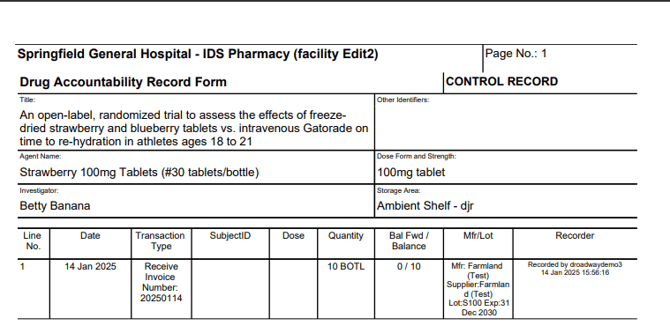
The PreClinical DARF is modeled after the IDS template form and is only available for sites that utilize Vestigo for PreClincal studies.
Note - This DARF form is only available to contracted preclinical sites.
- The Service Date can have an additional field to display the Rx Number under it.
- The Transaction Type column can display shipment receipt invoice number, the patient initials, inventory locations, or Inventory Adjustment Reasons, depending on the type of transaction.
- Subject ID number displays the PSN for dispenses. It can also display for other transactions if the inventory is assigned to a participant.
- Item numbers appear in the Mfr/Lot column.
- If the lot number is 012345 and the Item number is 1337, it will appear as Lot: 012345-1337
- Accountability comments, inventory returns and edits, can appear underneath the associated transaction.
- Patient Returns can appear on the right side of the dispense transactions.
ACTG
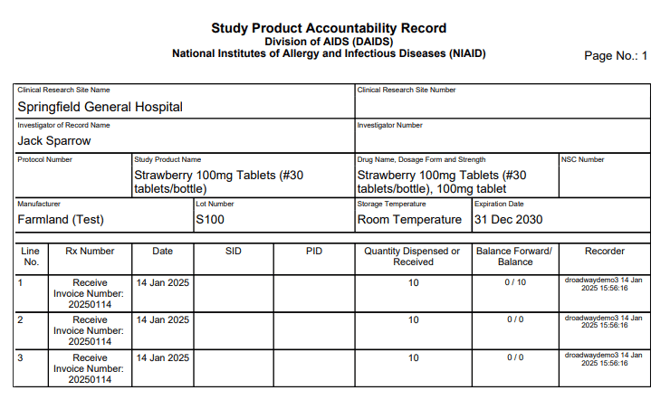
The AIDS Clinical Trials Group (ACTG) DARF would be uniquely used on ACTG Sponsored protocols. It is modeled after the most recent version of the form available on nih.gov.
Generic Lot Number Summary Log
The Generic Lot Number summary log ignores all item numbers recorded and displays inventory from the same lot/expiration on one form. Lot numbers may contain multiple forms if the inventory/lot number has changed locations.
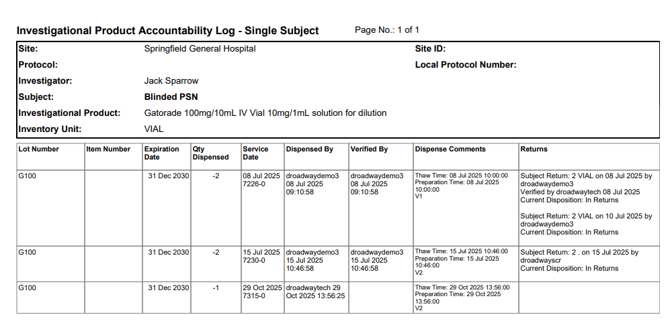
Single Subject DARF
The single subject DARF is useful when you are only looking for dispensed information on one subject.
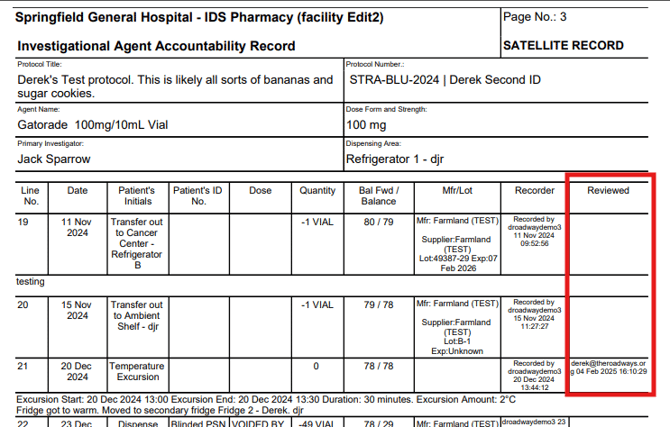
Monitor Review Report
The Monitor Review form is a modified version of the IDS DARF template. It adds an additional column to the report that indicates if the monitor has reviewed that transaction. If the transaction was reviewed, the monitor's email and time stamp will be present in the column.
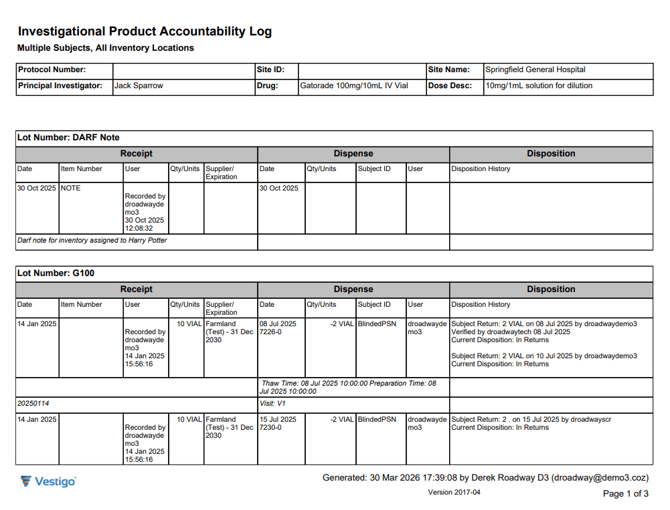
Summary - Lot Number
The Summary Lot Number form shows the lifecycle of the inventory, from receipt to final disposition. The left side will display the original receipt. The middle will display the dispense information, unless it was an inventory adjust. In that case, it will display the adjust information. The right side will display the final disposition, if any were recorded.
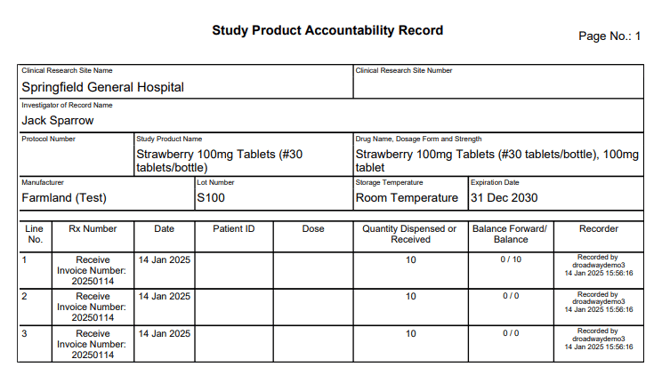
Blank Forms
Vestigo allows users to generate blank versions of the forms for drug builds. If selected, the user will have to choose which location they would like to appear on the form prior to generating. Users can generate blank versions of the NCI, NCI Oral, IDS, ACTG forms, and Summary Lot Number forms.