
Alerts are facility specific and grouped by function as listed below for a more efficient view. This means, that if you have access to multiple facilities but are logged into IDS Pharmacy, you will only see alerts relating to the IDS Pharmacy facility.
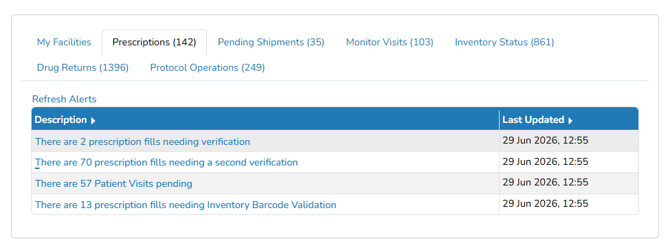
When selecting an alert tab, a list of related alerts will be displayed. The value in the parentheses on the tab selection indicates the number of total alerts for the tab or specific alert.
The Prescription Alert Tab is the default alert tab on the home screen and is not configurable by site users. There is also a tab that displays alerts for other facilities and allows you to switch to the facility if the user has permissions.
Required Permissions
There are various permissions required to access certain alerts. If you do not have the appropriate permission, the alert will be greyed out.
Facility Alert Settings
For some alerts, settings can be adjusted in Application Administration. To review or modify these settings, please review this KB article Managing Facility Alerts Refresh Intervals
Alert Descriptions
The Table below describes the tab groupings and alerts displayed in each of the categories.
|
Alert Tab |
Alert Name |
Alert Description |
|
|
My Facilities |
Facility Alert Summary |
Lists total alerts in the available facilities the user has permission to. |
Displays the total amount of active Alert Names in each facility. |
|
Prescriptions |
EMR Alert * |
Lists EMR Orders that are awaiting processing |
Displays orders associated with the facility in the EMR message that match the current facility in which the user is logged into. |
|
Prescriptions |
Patient Visits Pending |
List of all patient visits that are scheduled for that facility. |
A scheduled patient visit will display in the facility identified as the Main facility on the study. |
|
Prescriptions |
Second Unverified Prescription |
A list of prescriptions that require a 2nd verification. Once a prescription has been 2nd verified, if the Rx is edited, it will require a new 2nd verification. |
This alert will post prescriptions associated with the facility where user logged in. |
|
Prescriptions |
Unverified Prescription |
A list of prescriptions that have been entered by a user who does not have permission to verify a prescription. |
This alert will post prescriptions associated with the facility where user logged in. |
|
Prescriptions |
Barcode Validation * |
A list of prescriptions that have a dispensed drug with Barcode Validation required. |
This alert will post prescriptions where the order build has Inventory Validation and Inventory Scanning flag turned on. |
|
Pending Shipments |
Incoming Shipment Receipts Pending |
Lists all shipments to be received from an Internal Send Out performed on the same protocol in another facility. |
This will display in the facility where the Internal Send Out is sent to. |
|
Pending Shipments |
Shipment Receipt Verification |
Lists all shipments to be verified before completion |
This will post per facility where the shipment was entered for. |
|
Monitor Visits |
Monitor Return Actions |
Action Items: Visit Notes indicated to be an Action Item. |
Displays on the facility alert panel for the main facility on the protocol. |
|
Monitor Visits |
Monitor Site Requests |
Indicates and displays any monitor site requests generated by a monitor using “Contact a Site” on their account in “My Protocols” |
Displays on the facility alert panel for the main facility on the protocol. |
|
Monitor Visits |
Open Monitor Visit |
Open or closed visits that also have open access which includes visits/access in the future |
Displays on the alert panel for the facility in which the user is logged into and for which the monitor is scheduled. |
|
Inventory Status |
Drugs to Cycle Count |
Lists the inventories of drugs that have been set to Cycle Count per a number of days on the Drug Build. |
The alert will post on each facility for where inventory is or was (if no longer on hand in that location, the quantity found will be 0). |
|
Inventory Status |
Drugs to ReOrder |
Indicates all drugs that are set up as a manual reorder and have an inventory quantity on hand that is at or below the reorder point. |
Indicates all drugs that are set up as a manual reorder and have an inventory quantity on hand that is at or below the reorder point. |
|
Inventory Status |
Expired Inventory Records |
Lists all inventories that are expiring or expired based on the number of days look ahead set in the facility alerts section of app admin. Inventories that are at or beyond the recheck date will also display. |
Based on facility for inventory locations. |
|
Inventory Status |
Unresolved Cycle Count Discrepancies |
Indicates all cycle counts that, when saved, indicated a discrepancy. |
Displays on the facility alert for where the user was logged in when entering the cycle count that resulted in the discrepancy |
|
Inventory Status |
Inventory Transactions Needing a Quality Check |
Transactions that have been indicated to trigger a Quality Check. |
Displays on the facility associated with the inventory location and based on facility settings and date to start Quality Check. |
|
Drug Returns |
Quarantine |
Indicates the number of inventories that are in quarantine in studies. |
Displays on the alert panel for all facilities on the protocol. |
|
Drug Returns |
Returns |
Indicates the number of protocols where there are items in the returns section of Manage Drug Returns. |
Displays on the alert panel for all facilities on the protocol. |
|
Drug Returns |
Witness of Destruction Required |
Indicates details of inventory in destruction needing to be witnessed |
Displays in each facility alert panel based on the facilities on the protocol |
|
Drug Returns |
Witness of Return to Sponsor Required |
Indicates details of inventory in return to sponsor needing to be witnessed |
Displays in all facility alert panels based on the facilities on the protocol. |
|
Drug Returns |
Drug Returns Needing Verification |
Indicates any returns in Patient Returns that needs to be verified |
Displays in all facility alert panels based on the facilities on the protocol. |
|
Drug Returns |
Quarantined Items Needing Verification |
Indicates any inventory in Quarantine that needs to be verified |
Displays in all facility alert panels based on the facilities on the protocol. |
|
Protocol Operations |
Expired IRB |
Indicates the number of protocols that have an expired IRB. |
This alert downloads a report |
|
Protocol Operations |
Expired or Incomplete Competencies |
List of competencies where the completion is either expired or incomplete with a Hard Stop |
This alert displays information for the logged in user. Users may choose from the drop-down menu Hard, Soft, or both Stops. |
|
Protocol Operations |
Checklist Steps |
Lists any protocol and checklist related details for a checklist step assigned to the user |
Displays in any facility the user can be logged into as this is a user based alert. |
|
Protocol Operations |
NCI Expiration Dates |
List of contacts where there is an NCI expiration date listed and expiring within the next 30 days. |
This alert displays Address Book contacts with an NCI expiration date AND listed as an Authorized Prescriber on one or more protocols. |
|
Protocol Operations |
DEA Credentials * |
List of contacts where there is a DEA expiration date that has expired. |
This alert will only display for sites that have contractually opted in to track DEA credentials and the credential has expired on a Primary Investigator contact on a protocol. |
|
CTMS |
All CTMS Alerts * |
|
Displays participants with a to be enrolled or enrollment changes from the CTMS that match the current facility in which the user is logged into. |
* Alert will only be displayed if your site is contracted for the addon and an alert is present. For additional information regarding contracted addons, please contact support@mccreadiegroup.com.