
Vestigo enables sites to capture time-based workload by measuring how long it takes to complete specific tasks. Work is quantified in minutes, allowing organizations to assign time values to each activity. By configuring workload in your Vestigo environment, you can automatically track the amount of time users spend on different types of transactions. This data is available in downloadable Excel reports for easy sharing and analysis.
This KB is an overview Vestigo Workload.
Required Permissions
The below permissions are all related to workload and depending on the action the user is trying to take, they may need more than one of the permissions.
WorkloadCategories - Application Administration>Edit Client and Facility Settings>Workload Categories. Ability to manage the workload categories
AdHocWorkload - Create, Edit or Remove ad hoc workloads for a protocol
EditWorkload - Ability to edit workload tab. Protocol Management permissions are required
ViewWorkload - View workload in a protocol. Protocol Snapshot permissions are required
WorkloadReportsAccess - Ability to run Workload Reports
WorkloadTemplates - Manage Workload Templates
Workload Categories
Vestigo provides the main Categories for all sites. These categories cannot be modified, but they determine where the workload can be applied. In the table below, you will find the available categories along with some examples of their use.
| Category | Example(s) |
| Competency Management Workloads (Workloads related to competency management) | Competency Creation, Competency Completion |
| Dispensing Workloads (Workloads related to dispensing activities) | Prescription dispensing |
| Patient Enrollment Workloads (Workloads related to enrolling patients into a protocol) | Enrolling a participant, Changing Participant Arms |
| Inventory Workloads (Workloads related to inventory management) | Shipment receipts |
| Monitor Workloads (Workloads related to monitor visits) | Closing a Monitor Visit |
| Monthly Effort Workloads (Workloads related to protocol effort per month)* | Schedule based items |
| Protocol Setup Workloads (Workloads related to protocol initiation (Ad-Hoc)) | Protocol Set Up |
| Send Out Workload Workloads (Workloads related to send outs) | Send Outs (not including receives) |
| Protocol Close Workloads (Workloads related to protocol close) | Protocol Close Out |
* Items that have the category of Monthly Effort Workload will automatically be applied to every protocol on the first of each month where that Workload has been added.
Workload SubCategories
While the categories cannot be modified by the site, SubCategories allow the site to be as ambiguous or as granular as they want.
For example, in the Inventory Workloads, you could add "Shipment Receipt" which could encapsulate all the activities relating to a shipment receipt as defined by your site. If you wanted to be more granular, you could make multiple workload subcategories with varying times like "Shipment Receipt", "IRT Acknowledgement", or "Packing Slip Upload".
To learn more about Vestigo SubCategories, visit this page.
Templates
If you have multiple protocols that would use the same workload, users can build a template that includes multiple different types of workloads and then import them into each protocol. Once imported, the workloads time values can be adjusted for each workload as necessary.
Ad-Hoc
While most transactions in Vestigo allow you to apply workload to them, there may be some cases where you aren't able to automatically track the time values. In these instances, users can manually apply workload to a protocol using a workload subcategory on the Workload tab of the protocol.
Workload Statistics
There are two main reports users can use to review and analyze this information.
- Protocol Level - Reports tab on the protocol > Protocol Workload with Time Values
- Global Level - Reports tab on the top header of Vestigo > Workload with Time Values
Optionally, if your site has contracted for the Vestigo API feature, this data can be pulled by a technical analyst at your site to create a dashboard.
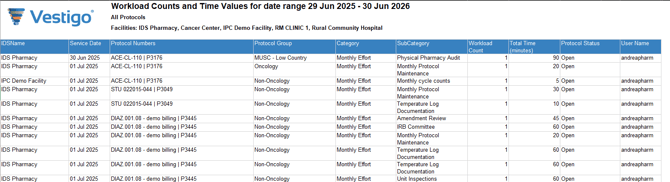
The Workload with Time Values Report
Provides users with a detailed breakdown of all workloads captured during a date range for all studies in one or all facilities. The data captured on this report includes:
- Facility the protocol is available in (per the Local tab in the Protocol build)
- Service date of the workload
- Protocol numbers
- Major Category
- Minor Category (Subcategory)
- Workload Count (Will always be 1)
- Total time in minutes
- Protocol Status (Open or Closed)
- Username
Protocol Workload with Time Values Report
This report provides the same statistics from above, but only associated workload values recorded for that protocol.