
The most common reason to delete an inventory return record that is any of these dispositions: (Quarantine, Items already Destroyed, Items Sent Back to Sponsor), is because the entry was not meant to be recorded or was a data entry error.
Deleting an Inventory return is different than deleting a return action such as a witness or destruction. When an inventory return is deleted, all subsequent actions taken are also removed and the inventory is placed back into the original location that it was quarantinedatined from. If you are deleting a return that is associated with a prescription, please refer to this article.
Note - This article covers deleting an inventory return only. If you need to return inventory that is currently in quarantine to stock and have that action visible on the DARF, please view this article.
Caution - All deletions are visible on the audit trail to IDS and Verify users.
- Navigate to the Protocol
- Click on the Inventory Tab
- Click on the correct Disposition tab
- Items in Quarantine
- Items already Destroyed
- Items Sent Back to Sponsor
- Locate the return and click on the Service Date
- Click the Delete This Return tab
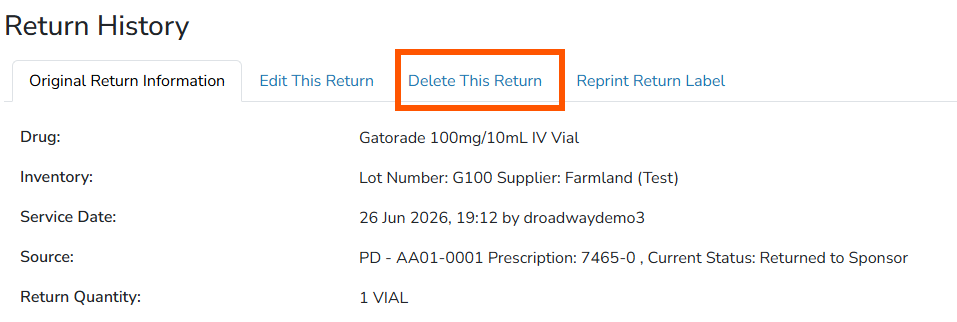
- The screen will display any actions taken on the inventory return and the user will need to enter a Reason for Deletion
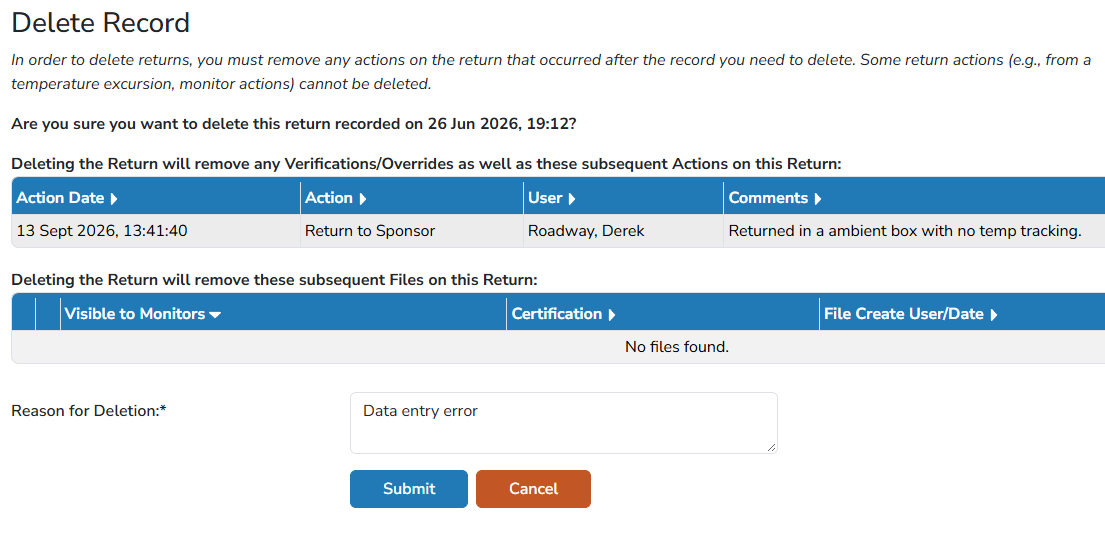
- Click the blue Submit button
Once submitted, the inventory will be moved back to the usable stock for further transactions.