
Vestigo’s document management module enables a paperless pharmacy binder, organizing files into clear sections. Features like drag-and-drop, filters, and pagination streamline navigation within the application.
There are three tabs to clearly distinguish documents for a protocol.
- Protocol Documents: Those related to the protocol and its operation, such as manuals and communications.
- Transaction Documents: Those associated to a specific transaction, such as an inventory receipt or dispensing. The files are reflected in the corresponding Document Section where they can be easily retrieved.
- Temperature Documents: Files related to inventory locations in a facility and are automatically pulled into a protocol.
Vestigo supports up to a max of 50 MB per file, and a variety of file types that include: .doc, .docx, .pdf, .jpg, .jpeg, .png, .gif, .txt, .xlsx, .xls, .ppt, .msg, .ttv, .tiff, .pptx.
While Vestigo does support the ability to upload email messages in the .msg format, we strongly encourage users to save the email as a PDF prior to uploading to ensure the file can be viewed by all users.
Suggestions for electronic documentation, organization and nomenclature can be found in the Electronic Document Nomenclature KB Article.
Permissions Needed
ProtocolSnapshot - Ability to view the Summary page of a Protocol (Protocol Snapshot). Required for all other protocol view permissions.
ProtocolManagement - Protocol Management
ProtocolDocuments - Ability to view and manage protocol documents in a protocol
EditPatientDocuments - Ability to add/edit documents associated with a patient
EditProtocolDocuments - Ability to edit Protocol Documents tab
EditTransactionDocuments - Ability to edit Transaction Documents tab
Contents
- Visbility Options
- Protocol Documents Tab
- Transaction Documents Tab
- Temperature Documents Tab
- Facility Documents
- Competency Documents
Visibility Options
When a file is added to Vestigo, it will have the client level default visibility options automatically set. These options are "Visible on Protocol" and "Visible to Monitor". When a File has the "Visible on Protocol" checked, the file is visible on the Protocol Documents or Transaction Documents tabs at Protocol Snapshot. When a File has the "Visible to Monitor" flag checked, the file will be visible to monitors when they are reviewing the protocol during a routine Visit.
Some files may have both flags checked, some may only have one, and some may have none. If a file has no visibility flags checked, the file will always be visible when the user is in Protocol Management mode, or commonly referred to as Edit Protocol.
Protocol Documents Tab
Protocol documents is designed to store information related to the protocol. Files like Protocols, Amendments, Pharmacy Manuals, and IBs can be added here. The files can be uploaded and sorted into one of the designated sections below:
-
Protocol Information
-
Dispensing Guidelines
-
Communications/Memos
-
Documents Visible on Patients/Subjects Tab
-
Order Documents Visible on Dispense
-
Other
-
Master Protocol Forms
While it is up to the site to determine how each Protocol Document section will be used, there are two sections that have expanded functionality.
Anything uploaded to the protocol and marked visible in the "Documents Visible on Patients/Subjects Tab" will display on the Patients/Subjects Tab and when viewing Protocol Documents tab in Protocol Snapshot within the Vestigo protocol.
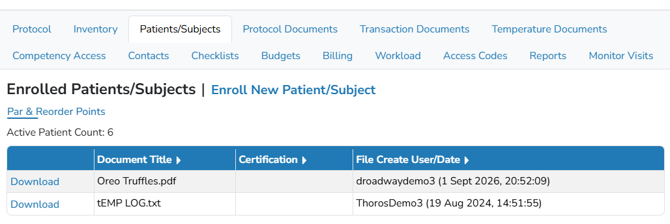
The "Order Documents Visible on Dispense" are managed at the Vestigo Order level. These are files can be referenced during dispensing, like a worksheet. 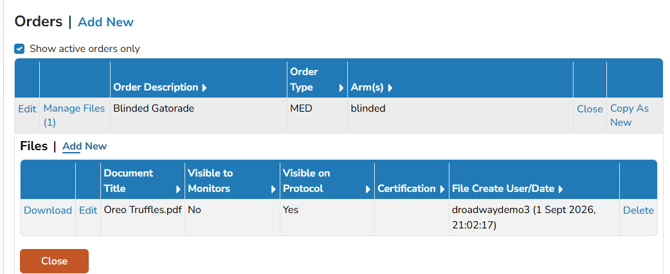
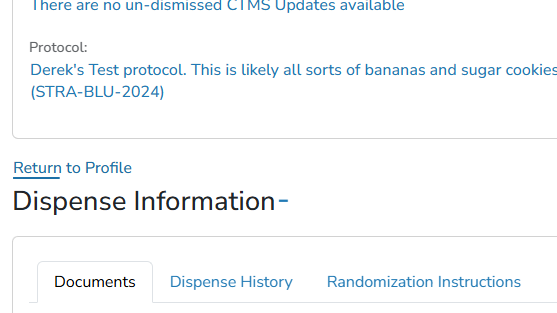
These can be referenced during dispensing while expanding the Dispense Information section.
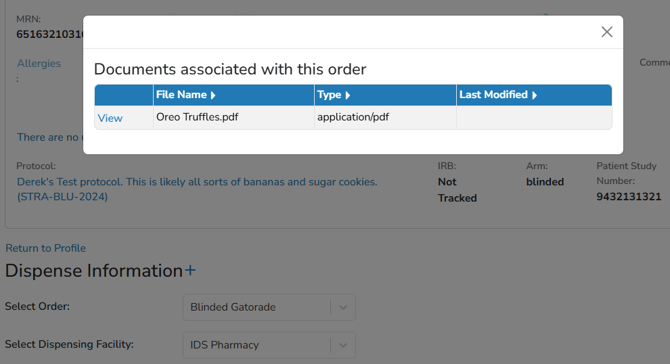
Additionally, these files may pop up in an alert style when the associated order is selected while dispensing. This does require a facility level setting that may be toggled to on or off. To learn more about this, please check out our Facility Switches article.
Historical Shipments
For studies that were active prior to Vestigo Version 5.1 (July 2020), there is also a section for shipment receipts previously associated with a receive completed prior to Vestigo Version 5.0 (February 2020).
The Protocol and Transaction Documents tabs each contain a section for Historical Shipment Receipts. Documents grouped under Historical Shipment Receipts, whether within Protocol Documents or Transaction Documents, relate to received items and were added to Vestigo before February 2020. If the document source was “Protocol” (uploaded via Edit Protocol > Documents), the document is now housed in Protocol Documents > Historical Shipment Receipts.
Transaction Documents Tab
Transaction documents pertain to individual transactions. These documents can be managed through the specific types of transactions listed below.
| Type | Where Managed |
| Prescription Documents | Managed at the patient profile for each unique Dispense. Can also be managed from Prescription Search function. |
| Shipment Receipts | Receive Inventory and Shipment Receive Search screens |
| Patient Documents | Patient Documents managed on the Patient/Subject tab |
| Patient Visit Documents | Documents added to unique patient visits . |
| Drug Returns | Managed in Manage Drug Returns. Documents are associated with individual returns. |
Historical Shipments
For studies that were active prior to Vestigo Version 5.1 (July 2020), there is also a section for shipment receipts previously associated with a receive completed prior to Vestigo Version 5.0 (February 2020).
The Protocol and Transaction Documents tabs each contain a section for Historical Shipment Receipts. Documents grouped under Historical Shipment Receipts, whether within Protocol Documents or Transaction Documents, relate to received items and were added to Vestigo before February 2020. If the document source was “Transaction” (uploaded directly on the Receive screen), the document is now housed in Transaction Documents > Historical Shipment Receipts.
Temperature Documents Tab
Temperature Documents will be viewable on the protocol on the Temperature Documents tab. There are five groups of temperature documents:
- Temperature logs
- Calibration Certificates
- Communication
- Temperature Excursions
- Other
Temperature documents are added within Inventory Management > Temperature Documents and associated with an inventory location. Those documents will automatically be added to the study where the inventory location has ever been used.
To learn more about adding Temperature Documents, please see the manual titled “Temperature Documents.”
Facility Documents
These are documents such as facility or staff licensure, SOPs, or site Policy and Procedures. Facility Documents are not protocol documents and will not be viewable on the protocol, but can be visible to monitors.
To learn more about Facility Documents, please see our Facility Documents KB.
Competency Documents
Documents can be attached to any competency. In Vestigo, documents associated with a competency are only accessible via Competency Management module.
To learn more about competency management, please review the Competency Management manual.