
Any inventory return can be edited and the most common reason to edit an inventory return record that is data entry error. When editing a inventory return record, any and all subsequent actions, such as approvals or witnesses, will be removed from the return record.
The edit functionality is not available on returns from a Vestigo Temperature Excursion, when the drug is associated with a voided return, or when marked as Unfit for Use while receiving.
When an edit is made to a return or return action, the DARF notes that a modification has occurred and includes (refer to audit log) for additional details. 
Caution - Return edits are visible on the DARF and on the protocol Audit Trail to both IDS and Verify users.
- Navigate to the Protocol
- Click on the Inventory Tab
- Click on Manage Drug Returns
- Click on the correct Disposition tab
- Patient Returns
- Items in Quarantine
- Items already Destroyed
- Items Sent Back to Sponsor
- Locate the return and click on the Service Date
- Click the Edit This Return tab
- The screen will display any subsequent actions taken on the inventory return and the user will need to enter a Reason for this Action
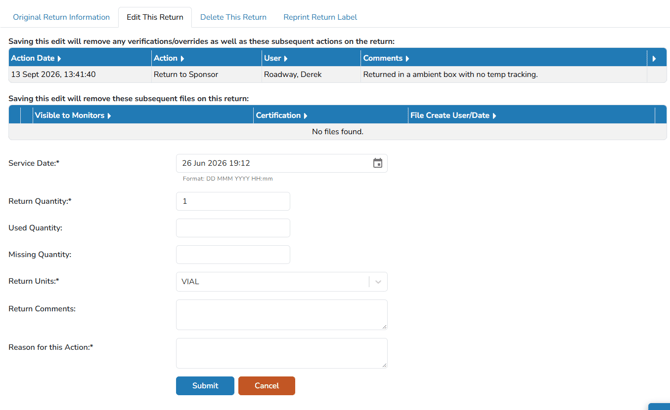
- Click the blue Submit button
Once submitted, all subsequent actions are reversed and the inventory will be placed back into quarantine or patient returns.