
The client can continue to modify/define which contacts to allow through the interface by identifying those roles in the Interface Mapping found from the Application Administration Screen. See our Interface Mapping article for more information
The CTMS Interface can be triggered to update contacts on a specific protocol by selecting the “Update from CTMS” link on the Edit Protocol: Contacts tab.
Contact Roles from the CTMS interface that are mapped to a Vestigo Contact role will have those contacts automatically be added to linked protocol. If available, Start and End dates are also synced. When syncing contacts, the interface will look to see if the CTMS contact record email exists within the Vestigo environment. If it does not exist, it will automatically create a contact record using the available email in the CTMS record.
Contents
- Site Specific Contact Roles and Designating a Role to be Authorized Prescriber
- NCI (CTEP) Designation and Expiration Dates
Site Specific Contact Roles and Designating a Role to be Authorized Prescriber
Clients can create any contact roles they need. During that process, they can set the default “authorized prescriber” for that role, if needed. When a contact is added with that role on a study, they will be defaulted as such, but it can be set to false, as needed.
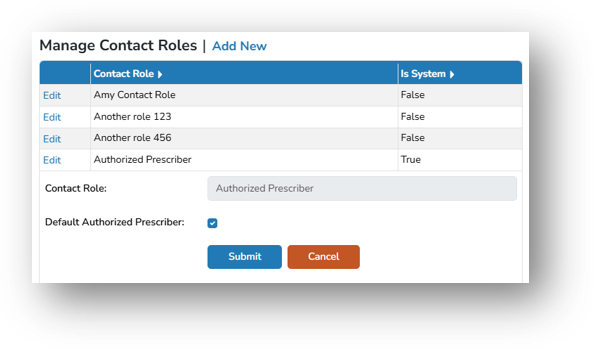
The default “authorized prescriber” designation for each contact role can be adjusted in Application Administration:
- Navigate to Application Administration
- Click on Edit Client/Facility Settings
- On the right side of the screen select Contact Roles
- Click Edit for the desired role
- Check or uncheck the box for “authorized prescriber”
By unchecking the box, when a contact with this role crosses the interface, the contact will not have the “authorized prescriber” box selected.
If a newly created Vestigo contact role should be linked to a CTMS contact role, this will have to be modified in the Interface Mapping section of Application Administration.
NCI (CTEP) Designation and Expiration Dates
For interfaces with OnCore, NCI Number and NCI Expiration Date will be returned, if available in Oncore and allowable into Vestigo. Sites can optionally choose to opt out of these updates during implementation. When the interface service updates:
- Contacts added to a protocol by a Vestigo user directly will never be removed.
- Contacts added to a protocol by the Interface Service will be updated to new roles when updated in the CTMS.
- Contacts added to a protocol by the Interface Service will be removed when removed in the CTMS
- Contacts added to a protocol by the Interface Service will update the contact’s name, phone, email and NCI information when updated in the CTMS. If the email belongs to a user with an account in Vestigo, the Vestigo authentication will update as well.