
Vestigo identifies four distinct types of Protocol Contacts. These contact types are separate from protocol contact roles.
- IDS staff who use Vestigo
- Contacts associated with the protocol
- External Monitors
- Read-Only users: Internal Reviewers/Study Coordinators
Tip - All contacts, except for External Monitors, must first be entered in the Address Book. Monitor’s information is universally used across all organizations and not stored in the site Address Book.
Required Permissions
ProtocolSnapshot – Ability to view the Summary page of a Protocol (Protocol Snapshot)
ViewContacts – View contacts in a protocol
ProtocolManagement – Allows a user to have the “Edit Protocol” option and access to the Main tab
EditProtocolContacts– Ability to edit Protocol Local tab. Protocol Management permissions are required
IDS Staff
These users do not have to be listed on the contacts screen of a protocol to have access to that protocol. Some sites where a team or individual has been assigned as lead on the protocol have added those users as contacts on the study.
Contacts
These contacts are those who are associated with the study and do not have access to Vestigo but their contact information and role are useful to those using that study. Examples of those contacts are the Primary Investigator, Co-Investigator(s), and other Authorized Prescribers. This will simplify dispensing as the system will provide these contacts as options for the prescriber.
External Monitors
Vestigo Verify is an application that External Monitors can use to review and authorize protocol transactions and more. Each site has full control over providing External Monitors with access. A monitor should not be a contact on a study. All monitor contact information should only reside on the Monitor Visits tab.
Read-Only users: Internal Reviewers/Study Coordinators
Vestigo comes with two additional roles - Internal Reviewers/Auditors and Study Coordinators. These roles are used in conjunction with our Read Only functionality to allow these users limited access to Vestigo. These users only have access when they are added to the contacts tab as either one of those two roles or are added as a Read Only User in Application Administration.
For any study where they should not have access but are a contact, they can be added with a different role, such as Study Coordinator – No Access.
Related articles for Protocol Specific Users: Adding A Protocol Specific User To Vestigo and Managing Protocol Specific Users On Protocols.
Contacts Grid
The grid of contacts will provide users with valuable information about the contact, access, user account type, and if linked (added) by a CTMS interface (if contracted).
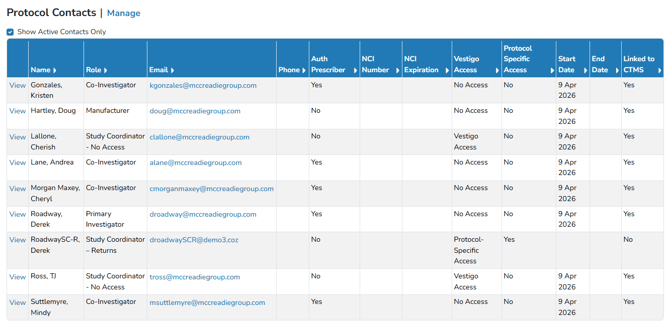
Clicking Manage will allow users to modify contacts on the protocol. Once in the Edit Protocol section of Contacts, users can click View to go back to the Protocol Snapshot of Contacts.
The Vestigo Access column indicates if the contact has a user account to log into Vestigo:
- No Access: Contact does not have user account; contact cannot log into Vestigo.
- Vestigo Access: Contact has a user account; contact can log into Vestigo. This is typically an IDS user.
- Protocol-Specific Access: Contact has a user account as a Protocol Specific User.
- InActive: Indicates the contacts user account is inactivated
The Protocol-Specific Access column indicates if the user has Protocol-Specific Access:
- Yes - The user’s contact role on this study grants them access to this study.
- No - The person’s contact role does not grant access to the study
Contacts and CTMS Interfaces
The Linked to CTMS column will be visible if you have a CTMS interface with Vestigo. If a contact shows as "Yes", the contact entry is mapped from CTMS interface to Vestigo and controlled by the interface. If a contact shows as "No", the contact was added to protocol manually or edited after synced with the CTMS.
If you notice a contact is displayed multiple times, this is due to the following situations:
- If the CTMS interface is active, contacts will be added to the Vestigo Contacts tab based on the mapped roles.
- If a contact’s role is manually edited from the CTMS mapped role, this will unlink that contact row from the CTMS interface.
- If the contact is added to the study manually, this entry will not be linked to the CTMS interface.
- If a mapped role is edited or a contact is added manually, upon the next update from the CTMS interface, the contact will be displayed again in an additional row with the mapped role from Oncore. The contact will be listed for each role and the “Linked to CTMS” will indicate which is linked.
Sites may contractually opt into Contact DEA Number and Expiration Date tracking with the CTMS interface. If a site is using this feature, the Contacts Grid will contain extra columns to track DEA Number and DEA Expiration Date. Both of those fields will be available when adding a Primary Investigator as a protocol contact to an existing protocol.